
Categories
Compliance Operations Retail

Retail task management software: how it transforms store visits and audits

43% of retail leaders say poor in-store execution is directly costing them sales, making it one of the most quantifiable and preventable revenue leaks in the industry. That gap rarely comes from strategy. It comes from what happens during store visits and audits: missed checks, delayed reporting, and inconsistent execution that create blind spots across revenue, compliance, and customer experience.

Retail task management software closes that gap by replacing fragmented, paper-based processes with real-time task assignment, standardized workflows, and digital audit trails.

The result is faster, more accurate audits and store teams freed from manual reporting. Digitized store visits save 1.5 hours per visit while increasing visual merchandising compliance by 30 percentage points.

In this article, we cover how store checklist and audit software improves store visit efficiency, transforms audit accuracy, and builds the ROI case for implementation. If you run those visits and audits across many locations, you’ll recognize every problem we describe. For the audit process itself, from audit types to checklists and scoring, see our complete guide to retail audits and store visits.

What is store checklist and audit software?

Store checklist and audit software is the part of a retail task management platform that organizes, assigns, tracks, and verifies operational tasks across single or multi-location retail store networks in real time, replacing fragmented communication tools with a single source of truth for store teams and district managers.

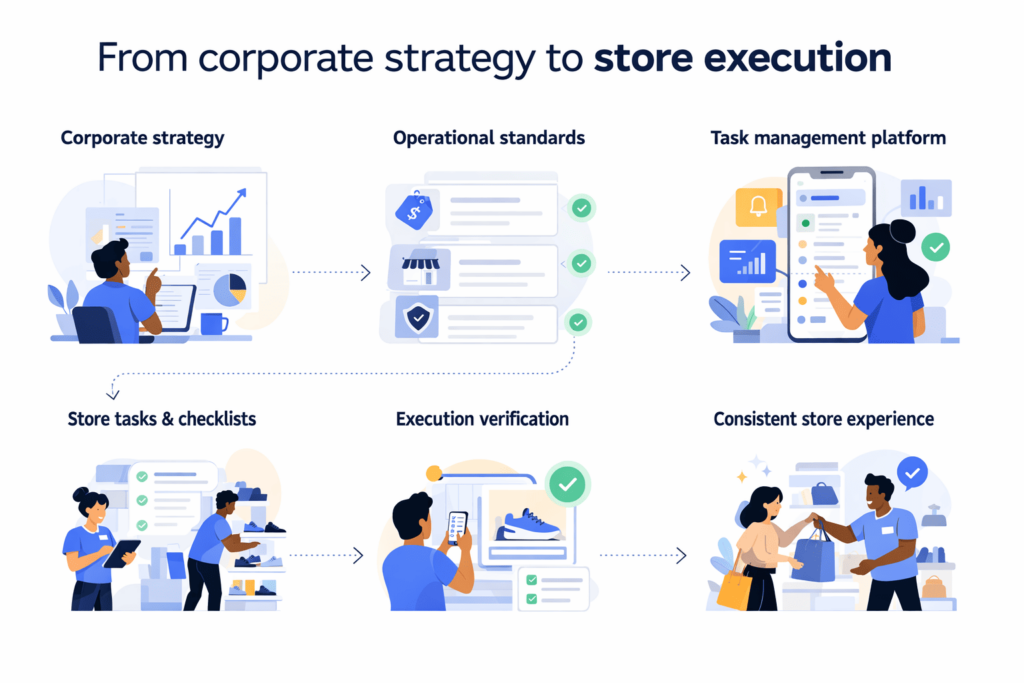
At its core, it acts as the execution layer between headquarters and stores, translating strategy into clear, actionable work at the frontline. It ensures priorities are consistently communicated, executed, and verified across every location.

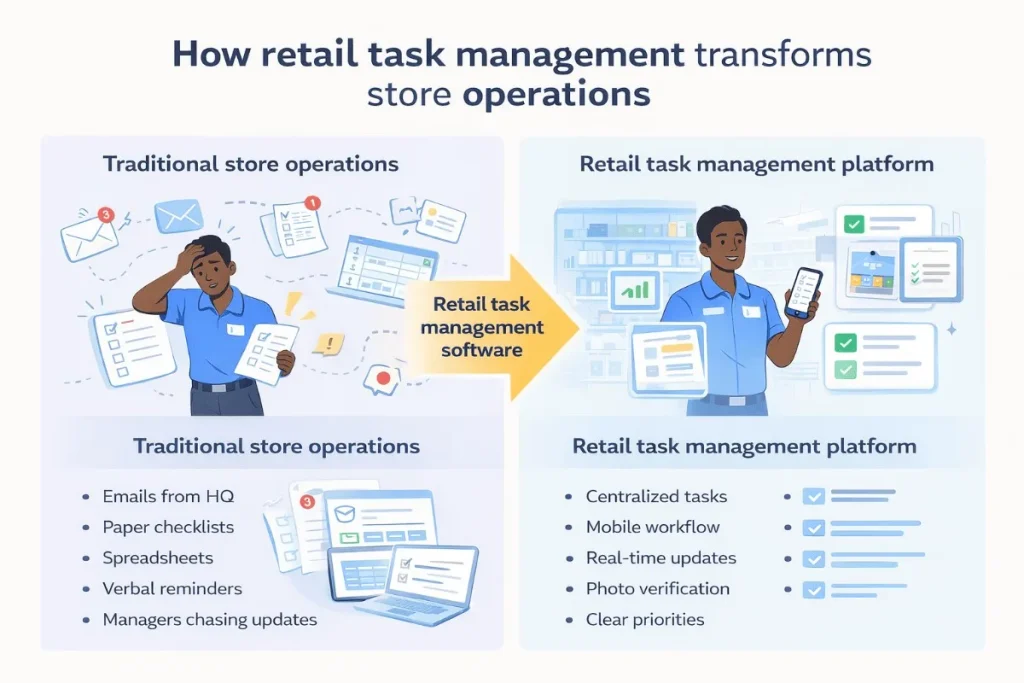
Instead of relying on emails, spreadsheets, or paper checklists, retailers use this software to standardize how work gets done and eliminate missed or duplicated tasks. When your teams start each shift with clear, prioritized direction rather than scattered messages, execution stops being a guessing game and becomes something you can count on in every location.

Store operations leaders, district managers, and field teams rely on this software to manage daily execution, compliance, and performance at scale. It sits at the intersection of workforce management, store operations, and retail compliance, but where those categories manage people, schedules, or standards broadly, retail task management software focuses specifically on execution: what gets done, by whom, and whether it was done right. If you manage a network, that last question is usually the hardest one to answer.

Key capabilities

Role-based task assignment and delegation Tasks are assigned based on role, skill set, and availability, ensuring work is distributed efficiently and preventing teams from being overwhelmed with irrelevant or low-priority activities.

Digital checklists and store execution workflows Structured checklists guide execution and reduce errors, making processes repeatable across stores while cutting training time for new associates.

Real-time task tracking and store visibility Live dashboards give managers immediate visibility into task completion, allowing them to act before issues escalate into compliance failures or lost sales.

Photo verification and compliance audit trails Built-in photo capture and timestamps provide proof of execution, improving accountability and removing the need for constant in-person oversight.

Offline mode and automatic data sync Teams can complete tasks and audits without connectivity, with data syncing automatically once back online, particularly valuable in large-format stores or locations with intermittent connectivity.

A woman uses a tablet on the shop floor of a menswear store — store execution, task management, associate with technology.

→ For a detailed look at how these capabilities translate into day-to-day store operations, see how store managers use retail task management software in practice.

Manual vs. digital task management

Manual processWith retail task management software
Task assignment✕Tasks shared via email or verbal instructions✓Tasks assigned in real time based on role and priority
Audit checklists✕Paper-based or inconsistent audit checklists✓Standardized digital checklists with clear criteria
Completion visibility✕Limited visibility into task completion✓Live dashboards showing progress across all stores
Reporting✕Delayed or incomplete reporting✓Instant reporting with photo verification and timestamps
Issue resolution✕Reactive issue resolution✓Proactive identification of compliance risks and gaps

This shift from manual coordination to structured, digital execution is what enables retailers to scale operations without losing control at the store level.

How does retail task management software improve store visits and audits?

Traditional store visits are time-intensive, inconsistent, and difficult to scale. Retail task management software addresses this in three key areas: reducing the administrative burden on district managers, closing the visibility gap between HQ and stores, and improving the frontline employee experience. Together, these changes convert store visits from a reporting obligation into a genuine driver of performance.

Reducing admin burden for district managers

Before:

Store visits are heavily administrative. District managers spend large portions of their time filling out paper checklists, compiling reports, and manually scoring performance, often after leaving the store. This delays feedback and limits the time available for coaching.

After:

Store visits become streamlined and focused. Digital checklists, automatic scoring, and instant reporting remove the need for manual documentation. We automatically calculate visit scores the moment a checklist is completed, generating structured reports that would previously take 30–45 minutes to produce. Managers can complete audits in real time and immediately shift their attention to in-store coaching, staff development, and fixing the issues the audit actually uncovered.

The impact is measurable. For a district manager who oversees 10 stores and runs monthly visits, that saved time adds up to roughly 15 hours a month, nearly two full working days that can be reinvested into team development and in-store execution.

A manager coaches an employee in a grocery produce aisle — training, coaching, supermarket operations.

This matters because the quality of store-level management is one of the biggest drivers of performance differences between locations. When district managers spend less time on documentation and more time developing their store teams, that difference compounds across every location they oversee.

Bridging the HQ-to-store perception gap

Before:

A headquarters team launches a new promotional directive. By the time it reaches stores through email chains, messaging apps, and regional calls, the message has fragmented. Some stores execute it correctly, others partially, others not at all, and HQ has no clear visibility into what’s actually happening until a field visit weeks later.

After:

We create a shared, real-time view of execution across all stores. HQ can see exactly which tasks are completed, overdue, or at risk, without waiting for a visit or manual report.

This visibility changes decision-making. If only 60% of stores have completed a priority task midweek, leaders can intervene immediately, clarify instructions, or identify operational blockers before performance is impacted.

Two young store owners review a tablet together in their boutique — small business, teamwork, retail tech.

The disconnect is real: HQ rates its understanding of store operations at 9.13 out of 10, while store leaders rate it at just 5.67. Organizations using unified platforms also report an 18-point improvement in feedback clarity. Closing that gap, even partially, means fewer misaligned initiatives, faster course-correction, and execution that actually reflects what headquarters intended.

Improving employee retention through clear task direction

Before:

Store teams operate in a constant state of ambiguity. Tasks come from multiple channels, priorities shift throughout the day, and unclear expectations create stress. When no one is sure which task matters most, that pressure builds shift after shift, and it quietly wears down the people you most want to keep.

After:

Work becomes structured and visible. An associate starts their shift and sees a prioritized task list: replenishment tasks for the morning, a compliance check at midday, and a merchandising update before close. There’s no confusion about what matters most or what’s already been completed. Managers can see progress without micromanaging, and teams execute knowing exactly what success looks like at the end of their shift.

This clarity has a measurable impact on retention. Retailers that implement task management platforms see voluntary churn decrease by 15–25%. In an industry where every frontline departure carries real recruiting, onboarding, and lost-productivity costs, cutting that churn delivers one of the fastest and most direct returns on your task management investment.

By removing ambiguity and aligning teams around clear priorities, task management software doesn’t just improve execution, it creates a more stable, productive, and scalable store environment, one that performs consistently whether you’re managing five locations or five hundred.

That same shift, from manual to digital, from reactive to real time, defines what modern retail audit software makes possible.

How does retail task management software improve store audits?

Traditional store audits are often inconsistent, delayed, and difficult to verify. As part of a broader retail compliance software strategy, digital store audits solve this by turning inspections into structured, data-driven workflows that standardize how audits are conducted, scored, and validated across every location.

This is the category often called retail audit software, and the right fit looks different depending on who you are. Luxury brands protect a precise in-store experience, franchise owners need consistency they don’t directly control, dedicated audit teams run high volumes across regions, and small or multi-location chains want enterprise rigor without enterprise overhead. We cover all of them with modular checklists for store visits and audits, automated scoring and analysis, mobile activity reporting, and drag-and-drop compliance dashboards.

The scale of the problem is hard to ignore. According to Coresight Research, U.S. retailers now lose an average of 5.5% of gross sales to in-store inefficiencies, and 81% lose at least 5% of operating margin to issues including out-of-stocks, price and promotion execution, and planogram compliance. The study, produced with Simbe, a retail-robotics vendor, surveyed 200 U.S. retail decision-makers.

By replacing paper-based processes with real-time data capture, these systems give retailers continuous visibility into execution. The three mechanisms below explain exactly how.

Structured checklists vs subjective inspection

Before:

Traditional audits rely heavily on subjective judgment. Questions like “Is the store clean?” leave room for interpretation, meaning two auditors can assess the same store differently. This inconsistency makes it difficult to compare performance across locations or identify systemic issues.

After:

Digital store audits use structured store inspection checklists with clear, observable criteria. Instead of vague prompts, auditors respond to specific statements such as “Floors are free of debris and spills” or “Shelves are dust-free.” These binary or measurable inputs ensure that every auditor evaluates the store against the same standard. This removes the scoring variance that makes cross-location benchmarking unreliable.

Picture an area manager midway through a store visit. They open the checklist on their phone, and a prompt flags that the promotional end-cap is missing two of its listed SKUs. They capture a photo and assign the fix before leaving the floor. On a paper checklist, that gap would have sat unnoticed until the report was typed up days later, if it was caught at all. That’s the difference you feel on the first visit.

This shift from subjective to objective assessment improves data quality, enables accurate benchmarking, and creates the consistent baseline that weighted audit scoring systems depend on.

Weighted scoring: critical, major, and minor items

Not all audit findings carry the same level of risk or impact. We use weighted audit scoring to prioritize what matters most, ensuring that high-risk issues are addressed first.

Audit item typeWhat it meansRetail example
Critical itemsIssues that pose immediate safety, legal, or regulatory risk and may trigger automatic audit failureFire safety violations, temperature violations
Major itemsStandards that directly impact customer experience or brand perceptionMissing promotional signage, incorrect pricing
Minor itemsLower-risk housekeeping or maintenance issues that affect store presentationLight shelf dusting, minor cleanliness issues

This hierarchical approach ensures that a store cannot “pass” an audit while failing on critical compliance checks. It also helps you prioritize corrective actions, directing time and resources where they have the greatest operational and financial impact.

When critical issues are missed, the cost of fixing them escalates quickly. A planned intervention is significantly less expensive than reacting to a failure after the fact, reinforcing why prioritization within audits is essential.

Geofencing and timestamps: eliminating phantom audits

A common and difficult-to-detect problem in traditional audits is the risk of “phantom audits,” reports completed without a verified store visit. This undermines trust in audit data and creates false visibility for headquarters.

Digital store audits eliminate this risk through geofencing and timestamped verification. Audits can only be initiated within a defined store location, and every action, from checklist responses to photo uploads, is automatically time-stamped, creating a verifiable audit trail.

For retailers operating in regulated environments such as grocery or pharmacy, this immutable record also serves as proof of due diligence in the event of a compliance inspection or regulatory challenge.

The result is higher data integrity, stronger accountability, and greater confidence in compliance reporting across the organization. If you’ve ever had to defend an audit trail, you know how much that certainty is worth.

The payoff shows up fast in daily operations.

Together, structured checklists, weighted scoring, and verified audit trails transform store audits from a periodic, subjective exercise into a continuous, data-driven compliance system. That foundation becomes even more powerful when artificial intelligence and IoT sensors are layered on top, automating the detection of issues that even the best-structured human audit would miss.

How are AI, computer vision, and IoT transforming store audits?

Retail task management is no longer just about assigning and tracking tasks. It’s increasingly about generating them automatically. As AI, computer vision, and IoT technologies mature, they are shifting retail execution from reactive workflows to predictive, self-triggering systems. Instead of waiting for store visits or manual audits to identify issues, retailers can now detect, prioritize, and resolve problems in real time, often triggering corrective tasks before store teams have had a chance to identify the issue manually. If you’ve ever learned about a wrong shelf only on your next visit, this is the shift that removes the wait.

While still emerging in many retail organizations, these capabilities are already delivering measurable results for early adopters and setting a new benchmark for execution visibility. This evolution positions retail task management software as the orchestration layer that connects data signals to frontline action, ensuring that insights translate directly into execution.

Automated planogram compliance via image recognition

Traditionally, verifying planogram compliance required slow, inconsistent manual checks. Computer vision changes that. A store associate captures a shelf image on their phone, and AI analyzes it instantly against the planogram. In other setups, fixed cameras monitor shelves continuously and flag deviations without any human trigger.

Either way, a gap that used to wait for the next audit becomes an assigned correction within minutes. You see what’s off-plan, who owns the fix, and when it’s resolved, without walking the floor yourself.

Proactive shelf monitoring: from reactive to predictive

Beyond planogram checks, computer vision enables continuous shelf monitoring throughout the trading day. Cameras and sensors detect out-of-stock items, misplaced products, and pricing errors in real time, automatically creating and assigning tasks within the platform so store teams can resolve issues immediately.

The same cameras also strengthen loss prevention, identifying behavioral anomalies such as product concealment or unusual browsing patterns that traditional fixed-camera surveillance typically misses. For you, that means availability gaps and shrinkage risks surface while there’s still time to act on them.

The store no longer waits for an audit to discover what’s wrong. It knows in real time and acts accordingly.

IoT sensors and predictive maintenance

While computer vision monitors what customers and staff can see, IoT sensors track what they cannot. This includes equipment performance, temperature conditions, and environmental factors that directly affect compliance and operational continuity. Temperature sensors in refrigeration units automatically log compliance data and trigger alerts when thresholds are exceeded, ensuring food safety standards are maintained without manual checks.

For retailers in regulated categories such as grocery, pharmacy, or convenience, this automated logging also creates an auditable compliance record required by food safety regulations, reducing the risk of gaps associated with manual processes.

A planned maintenance intervention costs far less than an emergency repair for the same failure, and across a large equipment fleet that gap is money you keep rather than spend reacting to breakdowns.

In this model, retail task management software does not just manage tasks. It anticipates them, assigns them, and closes the loop between what sensors detect and what store teams do. These systems augment rather than replace store teams, surfacing the issues that matter most so human judgment can be applied to decisions, exceptions, and customer interactions rather than routine detection.

Across planogram compliance, shelf availability, and equipment maintenance, AI and IoT are fundamentally changing what retail task management software can do. The evidence is clear. The question for most organizations is whether the financial case justifies implementation and what a realistic return looks like. Before you build that business case, it helps to see exactly where the return comes from, which is what the next section breaks down.

What ROI can retailers expect from task management software?

For retailers evaluating investment, the question is no longer whether retail task management software improves execution. It’s how quickly that improvement translates into measurable financial return. If you’re the one building the business case, here’s where the return actually comes from: direct cost savings, productivity gains, and risk mitigation. Together, these create a compounding impact that grows in proportion to the size of the retail network, making the investment case stronger as the business scales.

The following ranges are drawn from documented retail implementations and industry research, modeled on a mid-sized retail organization.

ROI pillarConservativeOptimisticMechanism
Direct cost savings100k250k+Reduced audit time, lower travel costs for district managers, elimination of paper-based reporting
Productivity gains150k250k+Time reclaimed from store visits, faster audit completion, reallocation of associate hours to customer-facing activity
Risk mitigation55k90k+Fewer compliance failures, reduced shrinkage, avoidance of emergency repair costs
Total annual value305k590k+Combined modeled annual impact

The standard formula for calculating first-year ROI applies directly here:

ROI = (Annual Benefits − Year 1 Investment) ÷ Year 1 Investment × 100

Apply this to your own numbers, your year-one investment against the annual benefits you expect to capture, and for a mid-sized network the result lands firmly in positive territory even on conservative assumptions.

Many of these gains begin within weeks of implementation, not months. Reduced audit time, improved compliance accuracy, and fewer stockouts typically appear early, creating immediate operational and financial impact.

Real-world results reinforce this. Mattress Firm reduced a 90-minute daily administrative process to just 10 minutes across 2,200 stores by automating task distribution through YOOBIC, contributing to over 128,000 hours saved annually and a 100% task completion rate.

Consistent execution across every store becomes the baseline rather than the exception. For a 500-store retailer, improvements to stockout rates and merchandise execution alone can generate up to $102 million in incremental annual revenue.

Retail task management software is not a marginal optimization. It is a high-impact operational investment with a measurable, repeatable return. One that strengthens as the business grows.

The next consideration is how to choose a platform, then how to implement it successfully and what determines whether you reach the conservative or aggressive end of that value range.

How to choose retail task management software

Once you’ve seen what the software can do, the real question is how to pick the right one for your stores. The criteria that matter most are the ones that decide whether frontline teams actually use it day to day.

  • Mobile-first workflows built for deskless store teams, not repurposed desktop dashboards
  • Flexible, modular audits you can adapt by format, region, or campaign
  • Real-time compliance analytics that show what’s done, overdue, or at risk
  • Retail-specific use cases out of the box, from visual merchandising to promotions

We meet each of these criteria: mobile-first by design, modular audits you configure yourself, live compliance dashboards, and workflows built for retail rather than bolted on. You can’t act on multi-location visibility without a system that gives it to you, which is why the platform matters as much as the checklist behind it.

Independent validation is a useful signal too. YOOBIC’s G2 leadership in retail task management reflects verified user reviews rather than vendor claims.

Pricing follows the same modular logic. Enterprise retail task management is priced per location or per user, and your total cost depends on which workflows you turn on across tasks, communications, learning, and AI, and how many locations are in scope. A focused rollout costs less than a full multi-workflow deployment, so you size it to what you actually need.

It’s worth adopting when you recognize one of these triggers:

  • You’re replacing email, spreadsheets, and paper checklists
  • You’re rolling out a promotional campaign across many stores at once
  • You’re standardizing store visits and audits across the network
  • You’re enforcing visual merchandising and compliance standards across formats

Picture a store-operations lead planning a rollout. Rather than flip the switch everywhere at once, they pick six stores and run a four-week pilot on store visits and audits. They watch completion rates climb and gather feedback from associates before committing to the wider rollout. By the time it reaches the full network, the case has already proven itself in their own stores, on their own shelves.

YOOBIC vs other retail task management approaches

Most frontline software sits on one side of a line: it either tells you what’s happening or it helps you act. If you’re weighing a unified platform against a point tool, the question isn’t which has more features, it’s which gets insight to the person who acts on it. Here’s how the two approaches compare with a platform that does both.

CapabilityIntelligence-only toolsExecution-only toolsYOOBIC unified platform
Surfaces performance intelligence✓ Core strength: benchmarks and insightsLimited: activity data without deeper analysis✓ AI surfaces the day’s priorities per store
Distributes tasks and communications✗ Built to inform, not to assign✓ Core strength✓ Tasks and comms in one flow
Mobile learning in the flow of work✗ Not an execution layerLimited: add-on at best✓ Delivered in the flow of work
Full frontline reach (associate to HQ)Limited: built for managers and HQ✓ Reaches associates✓ Associate to HQ
Closes the loop from data to decision to action✗ Insights rarely reach the floorLimited: acts without knowing what to prioritize✓ Data to decision to action on the floor
AI, computer vision, and IoT executionLimited: detection without assigned follow-up✗ No intelligence layer✓ Detected signals become assigned, verified tasks
Scale across formats and marketsLimitedLimited✓ Flagship to franchise, single market to multi-country

Intelligence-only approaches are genuinely good at surfacing performance insights, but they’re built for managers and HQ, so those insights rarely reach the associate who has to act on them. Execution-only approaches are strong at distributing tasks and communications, but without the intelligence to know what to execute or why. We bring tasks, communications, and learning into one platform, then connect what the data shows to the action a team takes on the floor.

One more difference worth weighing: we reach the full frontline across global retail brands like Michaels, Canada Goose, and Vans, from HQ to the associate on the floor, which is more reach than a point tool brings to the table.

How to implement retail task management software: a phased approach

The ROI case for retail task management software is compelling. But most implementation challenges fall into three areas: system integration, change management, and data security. Addressing each with a clear plan is what separates a rollout you can scale from one that stalls.

Most retailers follow a three-stage implementation model, rolling out in phases rather than all at once:

  1. Plan: Define priorities, map existing workflows, and identify integration points with ERP, workforce management, and POS systems.
  2. Build: Roll out core capabilities first, such as task assignment and digital checklists, before introducing more advanced features like AI-driven tasks or IoT integrations.
  3. Test: Validate performance in a controlled group of stores, refine processes, and then scale across the network.

Integrating with existing systems

Integration is often the first friction point. The answer is not full system replacement but incremental, API-driven integration. We connect to ERP, POS, and workforce systems through 200+ pre-built connectors, creating a unified execution layer without disrupting live operations.

Key integration principles include:

  • Map data flows between POS, ERP, and workforce systems before implementation begins
  • Use pre-built API connectors to reduce custom development time
  • Test end-to-end workflows in a staging environment before go-live
  • Plan for data quality issues such as duplicate records and inconsistent naming conventions, which are among the most common causes of implementation delays

The priority is eliminating data silos rather than rebuilding infrastructure.

Managing cultural resistance and driving adoption

Many store teams have built reliable workarounds in the absence of better tools, and change, even when it is an improvement, requires deliberate management. Overcoming this requires more than training. It requires demonstrating value at the store level.

Think about a store manager in the first 30 days of a rollout. They used to spend the opening hour on clipboards and callbacks before the doors opened. Now they clear the morning checklist on their phone in minutes and spend that reclaimed hour on the floor, greeting the first customers instead of chasing paperwork. That visible win is what turns a skeptic into an advocate on your team.

With the right approach, retailers typically achieve 80–92% adoption rates across store teams. The factors that drive this include:

  • Early involvement of store managers in the rollout process
  • Role-specific training tailored to daily responsibilities
  • Visible quick wins in the first 30 days, such as reduced admin time, clearer task prioritization, and managers spending measurably more time on the floor
  • Ongoing post-launch coaching rather than one-time training

Security and compliance requirements

We meet strict data privacy and security standards. This is especially critical for retailers handling employee data, payment systems, or regulated operations such as food safety and pharmacy services.

RegulationRelevance to retail task management
GDPR / CCPAGoverns employee and customer data; requires secure storage, automated data request handling, and right-to-erasure compliance.
MODPAEnforces strict data minimization and bans the “collect everything, decide later” approach.
PCI DSS v4Protects payment card data; requires access controls, activity logging, and regular security checks on any system that touches cardholder data.
HIPAARequires strict health data separation and access controls that prevent unauthorized access.
Applies to retailers with clinics or pharmacies

What to look for in a platform

Beyond implementation, selecting the right platform determines long-term success. Key capabilities to evaluate include:

  • Offline functionality with automatic data sync, particularly important for large-format stores or locations with unreliable connectivity
  • API integration capabilities with existing retail systems
  • Role-based access controls for secure data handling
  • Complete, timestamped audit trails for compliance reporting and regulatory defensibility
  • Mobile-first design that works for frontline teams, not just managers, since associate adoption determines whether the platform delivers its full value
  • Scalable architecture that supports AI, computer vision, and IoT integration as capabilities mature

Successful implementation is not just about deploying software. It is about aligning systems, processes, and people around a single, consistent standard for how work gets done across every store in the network. When done well, it ensures you capture the full operational and financial value outlined in the ROI section above.

The most successful implementations treat go-live as a starting point rather than an endpoint, with ongoing performance reviews ensuring the platform continues to deliver as the business evolves.

The next section addresses the questions most commonly raised during evaluation, from vendor selection and pricing to integration timelines and expected outcomes.

What digital store visits and audits make possible

Retail execution has always been the challenge, not the strategy. Retail task management software turns plans into consistent, measurable action across every store in the network.

The retailers who will lead the next decade are not those with the best strategy documents. They are those who can execute consistently, at scale, across every location. For retailers operating at that scale, the compounding impact of consistent execution represents one of the largest untapped value pools in the industry. The outcomes documented throughout this article are drawn from real implementations, not projections.

One platform unites tasks, communications, and learning, so a plan at HQ becomes a verified action on the floor. That is what lets you run store visits and audits as a performance engine rather than a reporting chore.

As AI and IoT capabilities mature, this foundation is moving toward fully autonomous retail operations. Systems will not only track execution but detect anomalies, trigger corrective actions, and optimize store performance continuously. The store visit of the future may not require a visit at all.

Book a demo to see how it works in practice across your store network.

Book a demo and find out how

Avoid wasted hours, blind spots,
and lost revenue with YOOBIC

Book a demo

Book a demo and find out how

Avoid wasted hours, blind spots
and lost revenue with YOOBIC
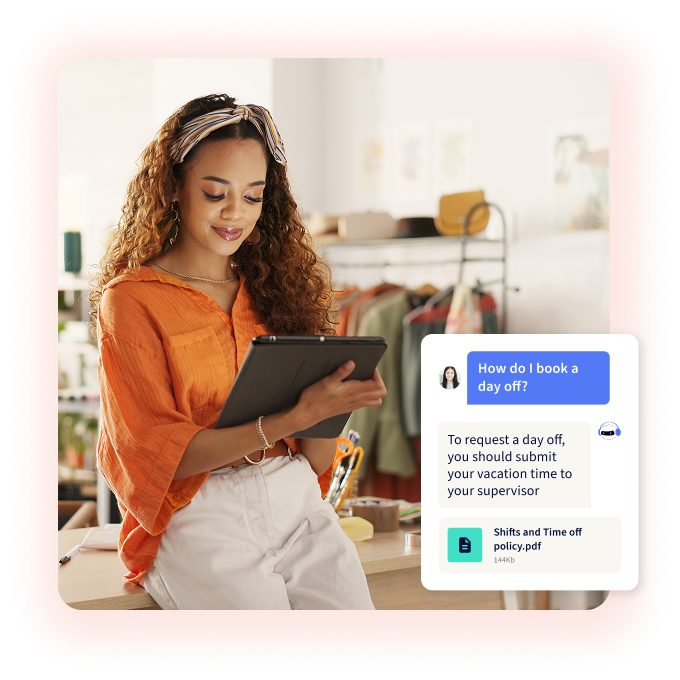
Frontline worker hero image

Frequently asked questions about store checklist and audit software

Who uses retail task management software?

Retail task management software is used across multiple roles, including store associates, store managers, district managers, and headquarters teams. Associates receive, complete, and verify daily tasks, store managers track completion rates and identify execution gaps, district managers monitor performance across locations, and HQ teams oversee compliance, promotions, and operational consistency in real time. Together, these roles form a connected execution layer from the associate completing a task to the HQ leader seeing it confirmed in real time.


How is retail task management software different from workforce management software?

Does retail task management software work without an internet connection?

Can retail task management software be used across multiple store formats?

What is the difference between a digital store audit and a traditional store audit?

How does retail task management software support omnichannel operations?

What features should retail task management software have?

Does retail task management software integrate with existing systems?

How much does retail task management software cost?

How should a manager handle failed audit checks and follow-up?

Can regional managers review exceptions across stores and assign follow-up?

Is retail task management software suitable for small or growing retailers?

Categories
Operations Retail

Store task management for associates: how to improve store execution

Retailers invest millions designing strategy: new promotions, new customer experiences, and new omnichannel capabilities. But much of that strategy breaks down at the store level, where store associates turn plans into finished work.

Coresight Research‘s 2025 State of In-Store Retailing study finds that retailers across sectors like grocery, drugstore, and mass merchandise lose about 5.5% of gross sales to in-store execution inefficiencies. Its data shows 81% of retailers report at least a 5% operating-margin loss from execution-related problems.

Store task management is how retailers plan, assign, prioritize, verify, and track the daily work store teams do, so corporate priorities actually get executed the same way in every location. It is the store-level side of retail task management.

Most retail leaders know what needs to happen. The challenge is getting it to happen consistently in every store you operate, across every shift. Store associates today manage far more than customer interactions.

A single shift may include replenishing shelves, setting up promotions, fulfilling click-and-collect orders, completing safety checks, and responding to operational updates from headquarters. As the physical store evolves into a hub for fulfillment, brand experience, and customer service, the complexity of frontline work has increased significantly.

Two supermarket colleagues in aprons check shelves with a tablet and scanner — inventory, on-shelf availability, compliance.

The impact of execution is measurable. Retailers that implement digital task management raise on-time task completion, while AI-driven operational tools help reduce stockouts. These improvements show that consistent execution on the sales floor directly influences revenue, operational efficiency, and customer experience.

→ Discover how AI for retail is moving from the back office to the shop floor to tackle inventory precision and streamline tasks in our AI in retail 101 guide.

Yet in many stores, frontline work is still coordinated through fragmented systems. Without clear prioritization or real-time visibility, associates often default to completing the easiest tasks rather than the most impactful ones. That operational drift widens the gap between headquarters strategy and store reality.

Retailers that pull ahead approach this differently. Instead of relying on ad hoc communication and manual tracking, they redesign how store work is organized, prioritized, and verified across locations.

Store task management is no longer just an operational tool. It has become a strategic capability that connects corporate priorities directly to frontline execution. It gives store associates the clarity to deliver consistent results in every store.

A woman uses a tablet on the shop floor of a menswear store — store execution, task management, associate with technology.

Key takeaways

Here’s what matters most if you’re trying to close the gap across your stores:

  • The execution gap is where headquarters plans and store-floor reality drift apart, quietly draining sales
  • Modern retail task management works as a coordination layer: real-time visibility, role-based delegation, digital verification, and AI prioritization
  • Technology only improves execution when frontline teams adopt it, so engagement and learning matter as much as the platform
  • Named retailers report measurable gains in hours saved, task completion, and compliance
  • Operational KPIs like task completion rate, compliance rate, and time to execution show whether store performance is improving

What is the execution gap between retail headquarters and the store floor?

The execution gap describes the disconnect between what retail leaders plan at headquarters and what actually happens inside stores.

Promotions, merchandising standards, and operational processes are carefully designed at the corporate level. But execution depends on hundreds or thousands of store associates carrying out those plans correctly, every day, across every location.

Closing this gap requires what many retailers recognize as a shared operational reality, where headquarters, regional leaders, and store teams all see the same priorities, tasks, and execution status in real time.

Without that shared view of operational work, strategy often struggles to translate into consistent store execution.

The gap between strategy and execution

Consider a typical seasonal campaign rollout.

Headquarters launches a new promotion across hundreds of locations, expecting displays installed, pricing updated, and inventory positioned to support demand.

But inside stores, execution often varies.

Some teams install displays immediately. Others receive instructions late or through multiple channels. Pricing updates are missed, stock is not replenished in time, and visual standards differ from store to store.

Without real-time visibility into execution, leadership teams cannot see where strategy is breaking down across locations.

Two young store owners review a tablet together in their boutique — small business, teamwork, retail tech.

Why the gap happens

One of the main causes is fragmentation in how store work is coordinated.

Operational tasks often arrive through disconnected systems, leaving store teams without a single source of truth. This fragmentation creates a second, less obvious problem: prioritization.

Store associates receive multiple instructions at once, often without clear guidance on what matters most. When everything feels urgent, employees naturally default to completing the quickest or easiest tasks first rather than the most operationally important ones.

Over time, this behavior creates operational drift. Critical tasks get delayed, store standards become inconsistent, and managers spend increasing amounts of time chasing updates instead of improving performance.

→ Find out why information overload is at the core of the execution gap and how you can simplify operations for your store teams.

What closing the gap requires

The most operationally mature retailers address this challenge by redesigning how operational work flows across their organizations.

Instead of relying on fragmented communication and manual tracking, they create a shared operational environment where store tasks are clearly prioritized, centrally assigned, and visible across every location.

When operational work becomes transparent and coordinated across the organization, leaders gain something they rarely have today: confidence that strategy is being executed consistently in every store.

What does modern store task management actually look like?

Modern store task management is often misunderstood as simply digitizing checklists or replacing paper task lists with mobile apps. In reality, the most effective systems function as an operational coordination layer that connects headquarters strategy with day-to-day execution in stores.

For leadership teams, the value lies less in the mechanics of assigning tasks and more in the visibility, alignment, and accountability these systems create across the organization.

Real-time operational visibility

Modern task management shifts store operations from a reactive process into one you can monitor and improve continuously.

In traditional retail environments, leadership teams rely on delayed reports, store visits, and anecdotal updates to understand whether operational initiatives are being executed correctly. By the time problems become visible, the opportunity to fix them has often passed.

Digital task management changes that. Headquarters, regional leaders, and store managers can see which tasks are assigned, in progress, or completed across every location, in real time.

This shared view allows retailers to identify execution gaps quickly, verify that campaigns are being implemented correctly, and intervene before small issues become larger operational problems.

Role-based delegation

One of the most overlooked benefits of modern task management is what it does for the store associate experience.

Operational instructions often arrive from multiple sources with little coordination. Associates must interpret priorities while managing busy store shifts.

Role-based delegation changes that dynamic. Tasks are assigned according to roles and responsibilities, ensuring that frontline associates focus on activities such as replenishment, merchandising, and order fulfillment while store leaders manage oversight and escalation.

For your associates, this clarity reduces cognitive overload and removes the uncertainty of deciding what to do next. For retailers, it ensures operational work is distributed efficiently across teams.

Accountability through digital verification

Execution only matters if it can be confirmed.

YOOBIC Task Management verifies work through time-stamped confirmations, photo-based feedback and approvals, and location-based activity tracking.

For organizations managing hundreds or thousands of locations, this verification layer turns store execution from anecdotal reporting into verifiable operational data. You stop taking “done” on faith and start seeing the proof.

→ Learn why visual merchandising software and real-time photo validation are critical for ensuring flawless execution across your entire network.

AI task prioritization

The most significant shift in modern task management is the move from reactive coordination to predictive operations.

YOOBIC AI analyzes operational signals such as inventory levels, demand patterns, and sales forecasts, and Store Manager Copilot turns them into prioritized daily actions for store teams.

For example, low-stock alerts can trigger replenishment tasks before shelves are empty, helping stores respond faster while reducing the cognitive load placed on frontline teams. That’s fewer, clearer priorities for your teams, not a longer to-do list.

Taken together, these capabilities fundamentally change how store operations are managed. Retail leaders gain real-time visibility into execution, store teams receive clearer priorities, and operational decisions become increasingly data-driven.

→ Discover how AI is already changing retail execution by moving managers from simply analyzing reports to acting on smart recommendations

What should retailers know about the task management technology landscape before investing?

Retail task management has evolved into a significant technology category. A growing number of platforms promise to improve store execution, but they differ widely in scope, architecture, and operational focus.

For retail leaders evaluating solutions, the most important distinctions are not between individual vendors but between platform models and deployment strategies.

Platform modelWhat it optimizes forBest fit
Enterprise platformsScalability, enterprise-software integration, and visibility across hundreds or thousands of locationsLarge store networks
SMB-focused solutionsEase of deployment and simplicity, often bundling task management with scheduling and communicationSmaller retailers that want simple, fast setup
Standalone execution platformsDeeper frontline functionality dedicated to store operationsTeams that want the most store-execution depth
Integrated ecosystemsTask management embedded in larger platforms to simplify IT managementTeams consolidating tools under one system

→ Learn more about building a solid tech foundation in our guide on why retail CIOs need to prioritize retail operations in their software strategy

Deployment considerations

Retailers must also decide how store teams will access operational tools.

Many organizations support bring-your-own-device (BYOD) approaches, allowing associates to use personal smartphones for work tasks. This reduces hardware costs but introduces considerations around security and workforce policies.

What to look for when evaluating a platform

Picture an area manager with a vendor shortlist taped to the monitor. Every demo looks impressive. But one question keeps coming up: would associates actually open this during a Saturday rush, or would it become one more tab no one checks?

That instinct is right. The strongest implementations rarely start with a feature list. They start with a clear picture of how work flows across your stores, and which model supports that flow at scale. When you compare options, weigh how each one handles the day-to-day:

  • Mobile-first workflows built for deskless store teams, not desktop software adapted for the floor
  • Flexible, modular audits and checklists you can adjust by store or region
  • Real-time compliance analytics and dashboards, not reports that arrive days later
  • Retail-specific depth for visual merchandising and promotion execution
  • Integration breadth that connects with the 200+ tools you already run, with no rip-and-replace

The clearest measure of whether any of these approaches works is what happens to execution performance after implementation.

Does store task management deliver measurable ROI?

Yes. Retailers that implement digital task management consistently report measurable gains in operational efficiency, store execution, and frontline productivity.

223,000 hours saved annually. Michaels digitized store tasks and communications across 1,350 stores. Task completion rates improved by 30%, daily customer readiness walks reached 98% compliance, and the retailer generated $1.8 million in incremental revenue by redirecting administrative time back to the sales floor.

90–95% task completion across 900 locations. Pilot Company replaced paper-based processes with digital execution, giving leadership real-time visibility into operational work across more than 900 locations and 30,000 employees. Store managers now complete tasks directly on mobile devices, significantly improving execution consistency across the network.

These results reflect a broader industry pattern. When operational work becomes visible, prioritized, and verifiable, store teams spend less time managing tasks and more time serving customers.

In a sector where small execution failures can quietly cost large retailers $10 million to $40 million per year, consistent store execution becomes a measurable commercial advantage.

The metrics to watch

If you want to know whether execution is actually improving, watch a focused set of operational KPIs:

  • Task completion rate
  • Compliance rate
  • Time to execution and time to compliance
  • Display and visual-merchandising compliance
  • Promotion rollout time
  • Checklist completion rate

Why is technology alone not enough to improve retail execution?

No matter how advanced a task management platform becomes, its success depends on the people using it. If your associates don’t adopt the system, none of the visibility matters.

That is why the most successful retailers approach task management not just as a technology rollout, but as a frontline engagement strategy.

Design for the frontline, not the boardroom

Employees ignore systems that feel like additional administrative work.

Platforms designed around frontline workflows, with mobile-first screens, simple task flows, and quick confirmations, remove friction and improve adoption.

Close the knowledge gap

Most operational failures are not technology failures. They are knowledge failures.

Think about a new associate’s first week. Instead of waiting for a trainer to walk the floor, they pull up a two-minute lesson on the same screen as the task and reset the planogram while the steps are still in front of them. The gap closes itself, right there in the aisle.

That’s microlearning in the flow of work. YOOBIC Learning delivers it on mobile, so associates learn a process while completing the real task, which speeds onboarding and improves compliance.

Boots saw this directly. After moving onboarding and process training onto the platform, the retailer cut the time teams spend on standard operating procedure (SOP) training.

Recognition drives consistent behavior

Execution standards are reinforced through behavior.

Retailers increasingly use recognition tools such as leaderboards, milestones, and achievement badges to encourage consistent task completion and reinforce operational standards.

The technology itself is only an enabler. The real competitive advantage lies with the associates who execute strategy every day on the sales floor. Retailers that combine operational technology with strong frontline engagement create environments where execution becomes both visible and sustainable.

→ Explore actionable ways to build a highly motivated team that consistently delivers results in our 5 Strategies for Mastering Engagement in Retail.

The future of retail execution

Between now and 2030, store operations will continue to evolve as retail becomes more connected, data-driven, and intelligent.

Three shifts will reshape how you coordinate work across your store network:

  • Unified commerce operations connecting ecommerce, supply chain, and physical retail
  • AI-driven task orchestration that generates and prioritizes work from real-time operational signals
  • Sustainability and compliance execution standardized across every location

The retailers that pull ahead will be those that treat execution as a strategic capability, not an operational afterthought.

Building this level of operational clarity is what separates reactive retailers from those that execute with precision.

→ Explore our complete guide to retail task management to learn how to connect corporate priorities directly to frontline action at scale.

The bottom line on store task management

Strategy is where retail competes. Execution is where it wins or stalls. A shared, prioritized, and verifiable way of working closes the gap between the plan at headquarters and the reality on the floor.

The biggest lever isn’t the software. It’s the people who run your stores every day, and when you give them clarity, they give you consistency.

That’s what we built YOOBIC to do. We bring tasks, communications, and learning together in one platform. It starts with what store teams need to act with confidence, then gives HQ the visibility to see it happen everywhere.

Book a demo and find out how. Avoid wasted hours, blind spots and lost revenue with YOOBIC. Book a demo

Book a demo and find out how

Avoid wasted hours, blind spots
and lost revenue with YOOBIC

Frontline worker hero image

Frequently asked questions about store task management

How does store task management help associates prioritize their work?

Retail task management platforms provide associates with a clear, prioritized list of tasks for each shift. Instead of relying on verbal instructions or scattered updates, employees can see exactly which tasks need to be completed first, helping them focus on the activities that have the greatest operational impact. If you lead store operations, that means fewer dropped priorities across every shift.

How does store task management reduce confusion for associates?

How does store task management support associates during busy trading periods?

Can store task management improve communication between headquarters and store teams?

How does store task management improve the associate experience?

How does real-time visibility impact store sales performance?

Categories
Operations Retail

How store managers use retail task management software

Store managers are the backbone of every retail location. They are responsible for staffing, merchandising, compliance, and customer experience, often all at once and all day long. Yet for many, the reality of the role looks less like leadership and more like firefighting.

Email threads go unread. Spreadsheets sit untouched. Paper checklists disappear between shifts. The tools meant to support store operations haven’t kept up with the complexity of the job, and managers are left to fill the gaps themselves.

This isn’t a reflection of store managers’ ability. It’s the result of operational systems that were never designed for the pace of modern retail.

Retail task management software changes that. Instead of juggling scattered instructions, store managers gain a single mobile system to coordinate work, assign tasks, verify execution, and track store performance directly from the sales floor.

→ For a deeper look at how these systems work in practice, see our complete guide to retail task management.

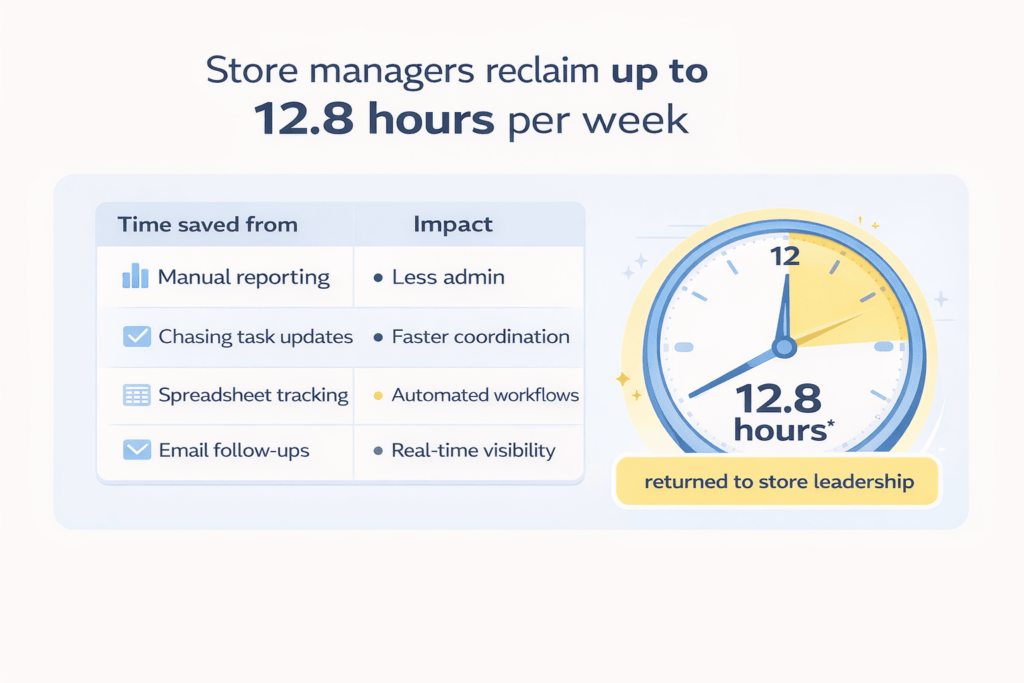
When store operations are digitized the way managers actually work, the impact is immediate. Managers reclaim hours previously lost to administrative coordination, time that can be reinvested in coaching teams, supporting customers, and running a store with confidence.

What is retail task management software?

Retail task management software is a mobile platform that turns head office instructions and store standards into tasks that store teams can see, complete and prove. It assigns work by store, role or shift, collects photo and checklist evidence, and shows completion in real time to store, regional and head office teams.

It replaces the emails, spreadsheets and paper checklists most stores still rely on. If you’ve ever rebuilt a lost checklist mid-shift, you know the cost. Instead of chasing updates or piecing together instructions, managers use a single mobile platform to:

  • prioritize daily store operations and opening or closing workflows
  • coordinate tasks across frontline teams during each shift
  • verify execution in real time through checklists, photos, and audits
  • manage compliance, maintenance requests, and operational reporting
  • monitor store performance and operational trends

By turning operational standards into clear, trackable tasks, these platforms remove much of the invisible administrative workload that slows managers down.

The result is faster execution, stronger accountability across the store, and more time for managers to focus on what actually drives performance: coaching teams, supporting customers, and leading the sales floor.

What does retail task management software allow store managers to do?

At its core, retail task management software gives store managers a structured way to run daily store operations. Instead of coordinating work through scattered tools and verbal reminders, operational standards are turned into clear, trackable tasks that the entire team can see and act on.

This structure allows managers to move from reactive problem-solving to coordinated execution across the store.

Prioritize daily store operations

Every store day starts with a long list of responsibilities: merchandising updates, stock checks, safety procedures, promotional launches, and more.

Without a clear system, these tasks often arrive through multiple channels. A message from headquarters in one email. A merchandising guideline buried in a document. A reminder from a regional manager during a call.

Retail task management software consolidates these instructions into a single workflow. Managers can review daily priorities, opening procedures, and operational updates in one place, helping the team focus on the work that matters most first.

This structure also reduces “task completion bias,” the tendency for teams to complete easier tasks before the most important ones when priorities are unclear.

Assign and coordinate work across the team

Once priorities are clear, managers need to coordinate how that work gets done across the team.

Task management platforms allow store managers to assign tasks based on:

  • shift schedules
  • store zones or departments
  • operational priorities

As the day unfolds, managers can adjust workloads in real time, reassign tasks, and track progress across the store.

YOOBIC’s mobile-first workflows let managers reassign and track this work from the sales floor, not the back office.

Verify execution across the store

In retail, assigning tasks isn’t enough. Execution has to be verified.

Retail task management software provides built-in validation tools that allow managers to confirm that work has been completed to standard. This often includes:

  • photo uploads of completed displays or store areas
  • digital checklists for operational procedures
  • compliance confirmations for safety and regulatory tasks

These verification steps create a clear audit trail and prevent “pencil-whipping,” where tasks are marked complete without actually being done.

The result is more consistent execution across stores and better visibility for both store and regional leadership.

Automate recurring tasks and track completion

Much of a store’s workload repeats every day or week: opening and closing checks, temperature logs, cleaning routines, price changes and campaign setups. Retail task management software automates this work so managers don’t have to rebuild it each time.

Automation usually covers four things:

  • Recurring tasks that publish on a set schedule, such as daily opening checklists or weekly safety walks.
  • Targeted assignment that sends each task only to the stores, departments or roles it applies to.
  • Reminders and escalations that alert the store when a deadline is close, and flag overdue tasks to the area manager.
  • Follow-up tasks created automatically when a checklist item fails, so issues get fixed rather than just recorded.

Tracking happens in the same place. Managers see which tasks are done, late or failed for their store. Area and regional managers see completion rates across every store they cover, so they know where to focus their next visit. For a deeper look at building these workflows, see our complete guide to retail task management.

Manage operational issues and store reporting

Beyond daily tasks, store managers constantly deal with unexpected operational issues.

Retail task management platforms give managers a structured way to handle these situations, including:

  • submitting maintenance requests
  • managing product recalls or compliance alerts
  • logging incidents or safety issues
  • submitting end-of-day operational reports

Instead of writing manual emails or compiling spreadsheets, managers can complete these workflows directly in the platform. Data such as sales metrics or staffing levels can often be pulled in automatically, reducing the time spent on administrative reporting.

For many retailers, this shift alone can return hours of time to store managers each week, time that can be reinvested in coaching teams and supporting customers.

→ One example of this in practice comes from Mattress Firm, where automated task management reduced 90-minute administrative routines to just 10 minutes across their store network.

Why does retail task management software give store managers time back on the sales floor?

Retail task management software reduces the hidden administrative workload that consumes much of a store manager’s day. By centralizing operational tasks, reporting, and team coordination into a single system, managers spend less time managing processes and more time leading teams on the sales floor.

Picture the start of a shift that used to begin at a desk. One manager pieced together the day from an overnight email, a brief saved in a shared drive, and a voicemail from the area manager.

Now they open a single prioritized list, see what matters first, and reach the floor before the first customer walks in. That’s the trade this creates: less time assembling the plan, more time running the store.

Retail managers carry a lot of coordination work that no one really sees: resolving scheduling conflicts, responding to corporate requests, troubleshooting systems, and following up on incomplete tasks.

Individually, these activities seem minor. Together, they consume hours of the workday and pull managers away from the sales floor.

A smiling female store owner in a plaid shirt holds a tablet on the shop floor — store manager, ownership, apparel.

Digital task management platforms reduce this coordination burden by turning store standards into structured workflows. Tasks, priorities, and completion status all live in one place, removing the need to track responsibilities across multiple tools or rely on memory.

The time impact can be significant. Centralizing tasks, reporting, and coordination into one system returns hours each week to the floor, hours previously spent on manual coordination and administrative work.

That time allows managers to focus on the work that actually drives store performance:

  • coaching associates
  • supporting customers
  • monitoring execution during peak trading periods, often called “golden hours”

Reclaiming a manager’s time on the floor becomes even more critical during high-pressure trading periods like the holiday rush.

→ Our playbook on empowering frontline teams explores how retailers maintain consistent execution when store traffic, promotions, and operational demands all peak at once.

Instead of operating as back-office administrators, store managers can spend more time leading teams directly on the floor. In retail, that leadership presence often makes the difference between average execution and exceptional store performance.

How is retail task management software different from generic project management tools?

If you’ve tried running store operations out of a general project management tool, you’ve probably hit the wall fast. Trello, Asana, and Monday-style tools were built for office teams who sit at a desk and manage work with a clear start and finish.

Store work doesn’t look like that. It repeats every day, moves across shifts and zones, and has to be proven on the floor, not marked done on a card.

One manager who tried to run a store refit through a project board watched half the tasks stall. The floor team couldn’t update them from a phone, and no one at head office could see what was actually finished. The plan looked fine on screen while the store fell behind.

What store teams needPurpose-built retail task managementGeneric project management tools
Mobile-first use for deskless store teamsBuilt for associates working the floor on a phoneDesigned for desk-based users on a laptop
Task routing by store, role, and shiftSends each task only to the stores, roles, and shifts it applies toAssigns to individuals or boards, not store networks
Photo and checklist verificationConfirms work with photos, checklists, and auditsMarks a card complete with no proof of execution
Real-time compliance analyticsShows completion and compliance across every store liveTracks project status, not store-by-store compliance
Retail use cases like visual merchandising and promotionsRuns merchandising missions and promotion setups with photo approvalGeneric tasks with no retail context

So why can’t you just bolt store work onto a tool you already have? The fit breaks down fast. In a Retail Systems Research (RSR) study, retailers said their associates spend too much time finding answers to customer questions (45%), on technology support (42%), and on administrative tasks (38%).

A generic tool hands out a task, but it can’t confirm the work was done right on the floor.

How to choose retail task management software

If you’re weighing options, judge each one against the floor, not the features page. Ask whether it covers:

  • deskless, mobile fit for associates who never touch a desktop
  • verification evidence like photos and checklists, not just a checkbox
  • store-by-store routing so the right task reaches the right team
  • compliance reporting that rolls up across the whole network
  • integrations with workforce, POS, and inventory systems

This is where YOOBIC Task Management fits. We built it for frontline store execution: mobile-first workflows for deskless teams, flexible modular audits, and real-time compliance analytics. It also handles visual merchandising and promotion execution built for retail.

Generic tools stop at distributing work. Purpose-built retail execution closes the loop, from store data to a decision to a verified action on the floor.

How does retail task management software improve store execution?

Retail task management software improves store execution by turning operational standards into clear, trackable tasks that store teams can follow and verify. This allows retailers to ensure merchandising, compliance, and operational routines are executed consistently across every location.

In retail, the challenge is rarely defining what should happen in stores. The difficulty is ensuring those standards are implemented the same way across dozens or hundreds of locations.

Store managers must coordinate merchandising updates, promotional launches, operational routines, and compliance tasks while managing a live retail environment. Without a clear system, execution can vary significantly between stores, creating inconsistencies in presentation, service, and operational efficiency.

These daily inconsistencies might seem minor, but they accumulate rapidly across a large network.

→ Read our in-depth analysis to uncover how the retail execution gap costs retailers up to $40M a year and what you can do to close it.

A woman uses a tablet on the shop floor of a menswear store — store execution, task management, associate with technology.

Digital task management platforms help close this gap by translating operational expectations into actionable work that frontline teams can follow throughout the day.

This directly supports several areas that influence store performance:

  • store presentation: ensuring merchandising standards, signage, and promotional displays are implemented correctly
  • staff availability: coordinating tasks so associates remain available to support customers
  • checkout efficiency: maintaining operational routines that reduce bottlenecks during busy trading periods
  • daily store operations: ensuring replenishment, cleaning, and safety checks are completed reliably

Because managers can see progress and completion in real time, issues are identified earlier and corrected faster. Over time, this visibility helps retailers reduce the execution gaps that often appear across large store networks.

Take a Friday display setup. An associate notices the new promotional end-cap doesn’t match the brief: the wrong shelf strip, a missing price card. Instead of guessing, they flag it against the photo standard and have it fixed before the weekend trade starts.

You catch the problem in the moment, not in next week’s sales report.

However, visibility only works when information is organized in a way that teams can actually act on. When store teams are overwhelmed by disjointed data and competing updates, execution can break down just as quickly.

→ Our guide on the retail execution gap explores why information overload often sits at the center of the problem and how retailers can simplify execution for frontline teams.

The result is not simply better task completion, but more consistent store performance and a more reliable customer experience across every store.

Trusted by leading retailers

You’ll find us behind the daily store operations at retail brands around the world, including Michaels, Canada Goose, Boots, Vans, Halfords, Pret a Manger, and Watches of Switzerland.

If you’re weighing whether this holds up at scale, the results come from real store networks:

The bottom line for store managers

Retail rarely fails because of strategy. More often, it breaks down at the point of store execution.

Promotions are planned, merchandising standards are defined, and operational procedures are documented. But without the right systems, those plans can become inconsistent once they reach the store floor.

Retail task management software helps close that gap. By turning operational expectations into clear, trackable tasks, it gives store managers a practical way to coordinate teams, verify execution, and maintain consistency across the store.

That’s what we built YOOBIC to do. We bring tasks, communications, and learning together in one platform. Your store teams execute with clarity on the floor, and your head office sees it happen across every location.

When store execution becomes visible and structured, managers can spend less time coordinating work and more time leading teams on the sales floor where it matters most.

→ Explore our complete guide to learn how retail task management acts as the connective tissue between corporate strategy and shop floor reality.

Book a demo and find out how

Avoid wasted hours, blind spots
and lost revenue with YOOBIC

Frontline worker hero image

FAQs

How is retail task management software different from basic task lists or spreadsheets?

How do retail headquarters teams use retail task management software?

What features should retailers look for in retail task management software?

Is retail task management software difficult for store teams to adopt?

Can retail task management software integrate with other store systems?

Categories
AI Operations Retail

The retail execution gap: how store-level mistakes can cost retailers $10M–$40M a year

Most retail leaders invest heavily in planning strategy.

Promotions are mapped months in advance. Vendor funding is negotiated. Merchandising calendars are carefully built. Marketing teams forecast the expected lift from every campaign.

But there is one number most retailers never measure.

It doesn’t show up on a P&L.
It rarely appears in executive reviews.
And it almost never gets discussed on earnings calls.

Yet it can be one of the largest hidden drains on retail profitability.

That number is the retail execution gap.

The retail execution gap is the difference between what headquarters plans and what actually happens on the store floor. Across large retail organizations, this gap can quietly destroy $10 million to $40 million in value every year, according to Boston Consulting Group.

Not because something catastrophic happens.

Because small execution failures occur every day across hundreds or thousands of stores.

A promotion launches late.
Signage is placed incorrectly.
A task gets skipped during a busy shift.
An associate never receives the briefing for a campaign.

Individually, each issue seems small.

But across an entire retail network, those small misses compound into one of the biggest hidden leaks in retail performance.

What is the retail execution gap?

The retail execution gap is the gap between operational plans created at headquarters and how consistently those plans are executed in stores.

It occurs when store teams:

  • Do not receive operational communications
  • Misinterpret instructions
  • Execute tasks inconsistently
  • Lack the training or tools needed to follow through

When execution gaps occur across hundreds of locations, they create lost revenue, operational inefficiency, and compliance risk.

In many retail organizations, the execution gap remains invisible until leaders begin measuring store-level performance systematically.

Why do retail leaders often overestimate store execution?

Retail leaders often overestimate store execution because most organizations measure whether instructions were sent, not whether they were executed correctly.

Ask a retail COO or head of store operations what percentage of stores executed a promotion correctly this week.The answer is usually 80–85%.

But when retailers implement structured measurement — through mystery shoppers, photographic store audits and visual verification, or structured reporting — the real number is often closer to 55–65% compliance.

That means there is typically a 15–25 percentage point gap between perceived execution and actual execution.

This gap doesn’t happen because store teams aren’t trying.

It happens because most retailers lack the systems to reliably connect headquarters strategy with frontline execution.

A directive leaves HQ.
An email is sent.
A manager acknowledges receipt.

But somewhere between the briefing and the start of the promotion, more than one third of stores execute incorrectly or not at all.

How much does poor retail execution cost businesses?

Poor retail execution can cost large retailers millions of dollars each year. When promotions, compliance tasks, and operational processes are executed inconsistently across stores, small failures compound across hundreds or thousands of locations, leading to lost sales, wasted vendor funding, and operational risk.

Retail performance rarely fails because of one major issue.

It fails because of thousands of small execution problems that accumulate across stores.

Consider a typical grocery retailer operating 500 locations.If store-level execution breaks down in just 30% of stores, the financial impact can quickly add up:

  • $780,000 in lost vendor funding due to poor promotional compliance
  • $3.9 million in missed promotional sales
  • $260,000 in lost revenue from uninformed associates
  • $250,000 in potential regulatory or safety fines

That’s more than $5 million in preventable losses every year.

And that example is conservative.

For many large retail organizations, the cost of poor execution easily reaches eight figures annually.

→ See how top retailers are using AI to catch these costly execution gaps before they impact the bottom line.

Book a demo and find out how

Avoid wasted hours, blind spots
and lost revenue with YOOBIC

Frontline worker hero image

What causes the retail execution gap?

The retail execution gap is usually caused by structural issues in frontline operations rather than a lack of effort from store teams. In most retail organizations, three operational gaps drive inconsistent execution: communication breakdowns, productivity friction, and workforce turnover. These gaps make it difficult for headquarters strategy to translate into consistent store-level execution.

Across large retail networks, even small operational gaps can compound quickly, affecting communication, productivity, and workforce stability.

1. The retail communication gap

One of the biggest causes of execution failure is simple: store teams never receive or fully understand operational instructions.

Most retailers rely heavily on email to communicate with stores.But email open rates from headquarters to frontline teams typically average 20–30%.Important information often gets buried in inboxes, forwarded across informal messaging apps, or printed and forgotten in back offices.

This kind of information overload is a growing operational challenge in retail. In fact, many retailers are discovering that too many messages can be just as damaging as too few.

→ Read more: The retail execution gap: why information overload is killing store performance.

As a result, the associate responsible for executing a promotion may never actually read the instructions.

Retailers that close this gap move away from broadcast communication and adopt:

  • Role-based messaging
  • Mobile-first communication tools
  • Read confirmations
  • Priority-based task delivery

These changes can increase communication engagement by 60–80% and dramatically improve store-level execution.

2. The retail productivity gap

Frontline retail employees often lose 15–25% of their working time to operational friction.

This includes:

  • Searching for information
  • Clarifying unclear instructions
  • Repeating tasks that were executed incorrectly
  • Navigating outdated administrative systems

The impact of this friction goes far beyond wasted time.It reduces customer-facing availability, slows store operations, and increases employee frustration.

In one large fuel and convenience retail network, operational friction across 15,000 employees was estimated to cost $28 million annually in lost productivity.

The problem isn’t employee performance.

It’s outdated operational infrastructure.

3. The retail turnover gap

Retail has some of the highest workforce turnover rates in any industry.

Many sectors experience 40–70% annual turnover, and in convenience retail it often exceeds 80%.

New employees typically take 6–10 weeks to reach full productivity.During that ramp period, they operate at roughly 60–70% of the effectiveness of experienced associates.

In high-turnover environments, a large portion of the workforce is always in this ramp phase.

That means execution quality is constantly fluctuating.

Research consistently shows that employees who feel informed, trained, and supported are 25–40% more likely to stay beyond the critical 90-day retention period.

Better frontline enablement improves both execution and retention.

→ Read our 4 best practices to positively impact your team retention and stop the costly revolving door of new hires.

How can better store execution increase retail revenue?

Improving store execution can generate significant revenue growth without requiring new stores or new products. When promotions, merchandising standards, and frontline training are executed consistently across locations, even small improvements in compliance can translate into millions of dollars in additional sales.

The retail execution gap is not just a cost problem.It is also a significant revenue opportunity.

Even modest improvements in execution consistency can generate major financial returns.

For example,if promotional compliance improves from 60% to 75%, the revenue impact can be significant.A retailer generating $1.2 million in annual revenue per store across 1,900 locations could see $11.4 million in incremental revenue from just a 0.5% improvement in execution performance.

No new stores.
No new product launches.

Just better execution of the existing plan.

Training also plays a critical role.

In many retail categories — especially foodservice, convenience, and specialty retail — trained associates can achieve two to three times higher conversion rates than untrained employees.

Across thousands of customer interactions, that difference creates a major margin opportunity.

 Why is the retail execution gap difficult to fix?

The retail execution gap persists because most retailers lack the systems, visibility, and operating models required to manage frontline execution at scale. In practice, three structural issues make the problem difficult to solve: limited visibility into store performance, outdated operational tools, and a rapidly changing frontline workforce.

1. Limited visibility into store execution

Most retailers lack real-time visibility into what is actually happening inside stores. Instead, they rely on delayed reporting from store visits, field audits, or mystery shopping programs.

This means execution issues are often discovered days or weeks after they occur, making it difficult for leadership to identify patterns or correct problems quickly.

2. Outdated tools for managing store operations

Many frontline operations are still managed using tools that were never designed for a mobile, deskless workforce. Frontline employees are often expected to:

  • Receive communications through email
  • Complete training through desktop learning systems
  • Track compliance using paper checklists

These disconnected systems create operational friction. Research shows frontline employees can lose 15–25% of their working time navigating fragmented systems, searching for information, or correcting execution errors.

3. A rapidly changing frontline workforce

Retail has some of the highest turnover rates of any industry, with many sectors experiencing 40–70% annual turnover, and convenience retail often exceeding 80%.

At the same time, the frontline workforce is increasingly made up of Gen Z employees, a generation that communicates through mobile apps, learns through video, and expects faster feedback and clearer guidance at work.

Many retail operating models, however, were designed for a different era. Store teams are still expected to rely on email communications, desktop training systems, and fragmented operational tools.

Retailers trying to manage a mobile-first workforce with legacy systems face a structural disadvantage.

How are leading retailers closing the retail execution gap?

Leading retailers are improving store execution by replacing fragmented communication and manual processes with systems that connect headquarters strategy directly to frontline execution. These systems provide real-time visibility into store performance and give teams the tools they need to execute tasks consistently across locations.

Instead of broadcasting instructions and hoping stores comply, they are building systems that connect strategy directly to execution.

That shift includes:

  • Targeted frontline communication delivered through mobile devices
  • Real-time visibility into store execution
  • Structured task management for store teams
  • Mobile-first training that accelerates onboarding
  • Data-driven operational insights for district managers

Retailers like Pilot Company, Vans, Michaels, David Jones, and Strand have implemented modern frontline operations platforms to improve execution consistency across large store networks.

The result is clearer communication, better operational visibility, and stronger store performance.

For retailers looking to operationalise these approaches during high-pressure retail periods, our playbook 6 Strategies for Peak Season Execution explores how leading brands structure frontline communication, task management, and store operations when execution matters most.

How is AI improving retail store execution?

AI is helping retailers improve store execution by identifying operational risks, prioritizing tasks, and giving managers real-time visibility into what is happening across their store networks. Instead of relying on delayed reporting or manual oversight, retailers can use AI to surface execution issues and guide daily operational decisions.

Store managers make more than 200 operational decisions every day, from prioritizing tasks to resolving execution issues in stores.

Frontline AI helps guide those decisions by identifying execution risks and highlighting the most important actions. For example, AI can help answer questions such as:

  • Which stores are at risk of missing promotional compliance?
  • Which tasks should managers prioritize today?
  • Where are execution issues emerging across the network?
  • Which teams need additional support?

By improving the quality of daily operational decisions, frontline AI drives improvements in:

  • Promotional compliance
  • Store productivity
  • Issue resolution speed
  • Employee engagement
  • Revenue performance

Retail execution rarely fails in big moments.

It fails in hundreds of small decisions every day.

AI helps retailers make those decisions better.

How can retailers measure the cost of their execution gap? 

Most retail organizations have some level of execution gap between what headquarters plans and what actually happens in stores. The critical question for retail leaders is not whether the gap exists, but how large it is and what it is costing the business each year.

Without structured visibility into store execution, many retailers underestimate the financial impact of missed promotions, inconsistent compliance, and operational inefficiencies.

For many organizations, the cost of the execution gap is larger than the combined impact of several major operational initiatives.

Understanding the size of that gap is the first step toward improving store performance.

How can retailers close the retail execution gap?

Retailers close the execution gap by giving frontline teams the systems and visibility needed to execute strategy consistently across stores. This typically requires improving communication, standardizing operational workflows, and providing real-time insight into store performance.

Retail strategy is created at headquarters.But retail performance is determined in stores.

Closing the execution gap requires giving frontline teams the tools they need to execute consistently, including:

  • Clear communication
  • Structured operational workflows
  • Real-time execution visibility
  • Continuous training
  • AI-powered operational insights

When execution improves, small operational gains compound across store networks. Consistent promotions, better-informed associates, and faster issue resolution all contribute to stronger financial performance.

Over time, the millions lost to execution gaps can become measurable gains in revenue, productivity, and customer experience.

Book a demo and find out how

Avoid wasted hours, blind spots
and lost revenue with YOOBIC

Frontline worker hero image

FAQs

What is the biggest issue facing retail right now?

One of the biggest challenges facing retailers today is operational complexity across large store networks. Rising labor costs, high employee turnover, and increasingly complex promotions make consistent store execution difficult. As a result, many retailers are focusing on improving frontline operations and gaining better visibility into store performance.

How can retailers identify whether they have an execution gap?

What metrics should retailers track to improve store execution?

What tools do retailers use to manage store execution?

What are the 5 KPIs in retail?

Categories
AI Operations Retail

Retail task management: the complete guide to store execution and performance

Retail task management is how retailers plan, assign, track and verify the daily work in every store, from opening checklists and replenishment to promotion setups and compliance checks. This guide covers examples and types of retail tasks, a seven-step process for managing them across multiple stores, a sample daily checklist, what to look for in retail task management software, and how to measure results.

Retail performance is decided by execution. Strategy is set at headquarters, but results are made on the shop floor, in every store, every day. A promotional display goes up on time. A compliance check gets done. A planogram reset is finished before the first customer walks in.

When that daily work holds together, strategy turns into sales. When it slips in even a handful of stores, the plan quietly leaks value. A 2024 Brightpearl by Sage survey of more than 1,000 US merchants found they spend 332 hours a year on manual admin. That’s time pulled away from customers, coaching, and selling.

That gap between planning and store-level action is often called the retail execution gap. As networks grow and teams get leaner, small breakdowns turn into missed promotions, uneven standards, and lost margin. Retail task management exists to close it.

DEFINITION:

Retail execution gap

The distance between what headquarters plans and what actually happens on the shop floor, measured in missed promotions, uneven standards, and lost sales.

Key takeaways

  • Retail task management is how retailers plan, assign, verify, and track the daily work that keeps every store running
  • It matters more now because leaner teams, omnichannel demands, and frontline turnover turn small execution gaps into margin loss
  • The core elements are planning, distribution, context, enablement, real-time visibility, and analytics
  • The strongest programs treat “assigned” and “done” as different things and verify high-impact work
  • YOOBIC unites tasks, communications, and learning in one platform, so priorities become completed, verified action on the floor
Fashion store associate helping a customer choose a dress

What is retail task management?

Retail task management is the system retailers use to plan, assign, track, and verify the operational work that keeps stores running. At its most powerful, it becomes the connective tissue between what headquarters decides and what actually happens on the shop floor. Platforms like YOOBIC bring tasks, communications, and learning into one mobile app, so store teams complete work on the floor and prove it with a photo.

DEFINITION:

Retail task management

The system retailers use to plan, assign, track, and verify store work, so standards set at headquarters are executed the same way in every location.

In practice, a product launch is set up correctly. A promotional display goes live on time. A planogram reset happens the same way across the whole network, not just in the best-run stores.

Generic task tools weren’t built for store task management. Store teams are deskless, and they serve customers while they work. They need tasks that are clear, mobile, and quick to complete between customer interactions. Retail task management software supports that through:

  • Role-based task distribution across locations
  • Real-time tracking and prioritization
  • Photo or timestamp validation
  • Central visibility for store, district, and HQ teams

Done well, retail task management turns daily store activity into consistent, measurable execution at scale.

What are examples of retail tasks?

Retail tasks are the recurring and one-off jobs that keep a store trading to standard. Most fall into four groups by how often they happen:

How oftenExample retail tasks
DailyOpening and closing checklists, till and cash checks, gap scans and replenishment, price changes and markdowns, cleaning and food-safety logs, click-and-collect picking
WeeklyPlanogram and bay checks, stock counts on priority lines, delivery and stockroom organization, rota and coverage review, a store walk with an action list
Monthly or quarterlyHealth and safety audits, equipment and maintenance checks, full inventory counts, compliance self-assessments, training and certification renewals
Campaign and one-offPromotional display setups, seasonal resets, new product launches, product recalls and withdrawals, store events and visual merchandising changes

Types of retail tasks

Retail tasks also differ by how they are structured, which decides how you assign and verify them:

  • Recurring tasks: routines on a fixed schedule, like opening checks or temperature logs. Automate them so they appear at the right time without anyone resending them.
  • One-off tasks: single actions with a deadline, like swapping signage or pulling a recalled product. Send them only to the stores and roles they apply to.
  • Campaign tasks: a set of linked tasks behind one initiative, such as a seasonal reset or product launch, often with one go-live date across the whole network.
  • Checklist tasks: one task made of several steps, like a store opening routine or a safety audit, where every step needs a clear Pass or Fail.
  • Corrective tasks: follow-up actions created when an audit, store visit or data signal finds a problem. Each needs an owner, a due date and proof the fix was made.

High-impact tasks of any type should require photo or checklist proof. Low-risk routines can be confirmed with a simple check-off.

Grocery store team checking shelf stock with a tablet and a handheld scanner

Why does retail task management matter more than ever?

Retail task management matters more than ever because each store team now carries more work with fewer people. Omnichannel fulfillment, frequent promotions, product launches, compliance demands, and turnover all land on the same shift. Without structure, that complexity becomes variability, store by store.

Three pressures make execution a commercial issue, not just an operational one.

Brand consistency depends on structure

Every store represents the brand. Missed resets, missing signage, and pricing errors erode customer trust quickly. Retail task management turns brand standards into specific, verifiable tasks and standardized routines. As a result, consistency depends on process rather than good intentions.

Small execution gaps cost revenue

Availability and promotional compliance are where execution meets sales. When a promotion launches late or a shelf sits empty, the sale is simply lost. When corrective actions are assigned and verified early, small gaps stop compounding across the network.

Labor hours are too expensive to waste

Every hour spent clarifying instructions, chasing updates, or redoing work is a paid hour that never reaches the customer. Structured task management removes that friction. It centralizes task assignment, clarifies ownership and deadlines, and cuts duplicate communication.

What are the core elements of retail task management?

The core elements of retail task management are planning, task distribution, context and enablement, real-time visibility, and analytics. Together, they make sure strategy is carried out the same way in every store. When one element is weak, execution gaps widen and performance varies across the network.

1. Planning and standards

Retail task management begins before a task is assigned. Store teams need to know exactly what good looks like before they can deliver it. That clarity starts with headquarters defining:

  • What needs to happen
  • Who is responsible
  • When it must be completed
  • What “done correctly” looks like

INSIGHT

A task is only as good as its definition of done. If a store can’t tell what complete looks like, no one can verify it either.

In YOOBIC, each task carries its instructions, owner, deadline, and photo standard in one place. Every store works from the same definition of done.

Without that clarity, performance depends on individual interpretation. Stores improvise, rollouts slip, and compliance becomes uneven. Tasks that need clarification or correction also consume paid hours without improving output.

2. Structured task distribution

Once standards are set, retail task management moves priorities through the organization with precision. Tasks should be:

  • Assigned by role, location, or region
  • Prioritized by business impact
  • Delivered with clear deadlines
  • Supported by planograms, visuals, or step-by-step guidance
  • Automated where they recur

When priorities arrive through disconnected channels, high-impact tasks compete with low-value ones. Stores are left to decide what matters most. Centralized retail task management replaces that ambiguity with one role-specific source of truth. With YOOBIC, HQ, field managers, and store teams share one live view of what’s assigned, done, and overdue.

3. Context and enablement in the flow of work

A task on its own isn’t enough. Store teams need to understand the purpose and standard behind the work. They also need the know-how to complete it correctly the first time.

That means instructions, visuals, and proof requirements arrive with the task, not in a separate email. Good frontline team communication is built into the work itself, which is how YOOBIC Communications keeps updates tied to the task they describe. It also means training sits next to the work. When microlearning, visual SOPs, and certifications sit next to the task, new associates get up to speed faster. They also make fewer first-time errors.

Michaels saw a 150% increase in learning program participation after putting YOOBIC microlearning into the flow of work.

That support pays off beyond the task itself. Gallup’s 2024 meta-analysis of more than 183,000 teams found the most engaged business units see 23% higher profitability and 28% less shrinkage than the least engaged.

4. Real-time visibility and verification

Retail task management turns store activity into structured, verifiable data. Without it, you rely on delayed audits and fragmented reports. By the time issues surface, they’ve often already hit sales or compliance.

Live task tracking, store- and region-level dashboards, overdue alerts, and photo-based verification change that. With visibility built into daily workflows, managers focus on variance instead of reviewing every location by hand. Earlier intervention stops small breakdowns from compounding across the network.

“Within seconds in the boardroom I can pull up the platform and validate execution across the entire chain.”

Chris Freeman, SVP of Store Operations, Michaels

5. Analytics and continuous improvement

The final element is analytics. Completion rates, compliance trends, and time-to-resolution turn daily activity into insight. They reveal recurring gaps, training needs, and the link between execution and sales.

When that data feeds back into planning and prioritization, each cycle gets more precise. That’s how you close the loop between strategy, action, and performance.

How do you manage retail tasks? 7 steps for multi-store retailers

You manage retail tasks across multiple stores by running a continuous loop: map the work, plan, communicate, execute, verify, monitor, and improve. Each cycle turns strategy into store-level work and uses the results to sharpen the next one. Replacing ad hoc coordination with this repeatable process is what makes retail store task management consistent at scale.

  1. Map the work. List every recurring and one-off task your stores handle, group them by frequency and type, and give each one an owner role. Cut or merge tasks that do not change an outcome. Fewer, clearer tasks get done.
  2. Plan. Standardize recurring processes and set clear scope, owners, and deadlines before work reaches stores. Align labor capacity, compliance requirements, and promotional priorities up front rather than negotiating them store by store.
  3. Communicate. Send tasks through one centralized, role-specific channel. Instructions, visuals, and completion criteria arrive together, so interpretation doesn’t vary from location to location.
  4. Execute. Store teams complete tasks within their daily workflow, on mobile, without leaving the sales floor. See how task management for store associates works on the floor. Execution is measured against defined standards, not informal confirmation.
  5. Verify. Treat “assigned” and “done” as different things. Capture photo, timestamp, or checklist proof for high-impact work. DFS reached 97% task compliance with YOOBIC.
  6. Monitor and escalate. Track task progress, compliance, and variance in real time. Overdue or failed tasks trigger alerts, so field leaders manage exceptions instead of chasing every store.

  7. Improve. Analyze task data for recurring gaps, workload imbalances, and training needs. Then feed what you learn into the next cycle.

Retail task management works as a feedback loop. Planning guides execution, execution creates data, and data refines future planning. As the cycle repeats, variability drops and store performance becomes more predictable. For a field leader’s take on running this loop, listen to Frontline Fridays: The Six Cs of Execution.

Sample daily store task checklist

Here is what a daily task list can look like once it is structured. Adapt it to your formats. What matters is that every item has an owner, a time and a clear definition of done.

WhenTaskProof
Before openingWalk the entrance, windows, fitting rooms and sales floor: clean, safe and ready to tradeChecklist
Before openingTills open, floats counted, card terminals workingChecklist
Before openingPromotions live and shelf prices correct on promoted linesPhoto
MorningGap scan and replenishment of priority linesChecklist
MorningTemperature and food-safety checks logged, where relevantLog entry
MiddayClick-and-collect orders picked and stagedTimestamp
MiddayOverdue HQ tasks reviewed and reassignedDashboard
AfternoonPlanogram or display check in one priority bayPhoto
ClosingCash-up, safe and key controlChecklist
ClosingFire exits clear, doors locked, alarm setChecklist
store manager counting retail store inventory

How does retail task management improve daily store performance?

Retail task management improves daily store performance by turning operational routines into structured, prioritized, and measurable work. Merchandising plans, inventory routines, compliance checks, and launches get done correctly and on time across the network.

Merchandising and planogram compliance

Merchandising execution decides whether strategy converts into sales. Retail task management improves it through:

  • Role-specific planogram instructions
  • Deadline-driven resets
  • Image-based verification
  • Compliance visibility by store and region

Picture a store team at Sportscene finishing a promotional reset before the morning rush. They photograph the display, and VM Copilot checks it against the brand standard, so any issue is fixed before it reaches a customer. Working this way, Sportscene lifted store execution on visual merchandising and promotions by 60% with YOOBIC. That’s what visual merchandising compliance looks like when photo validation happens in real time, not during a monthly visit.

Inventory and on-shelf availability

On-shelf availability is one of the most direct drivers of revenue. IHL Group estimates that inventory distortion, meaning out-of-stocks and overstocks, cost retailers $1.77 trillion globally in 2023. Many of those losses start in the store. A replenishment check gets missed, a cycle count is skipped, or the backroom and shelf fall out of sync.

Retail task management builds inventory routines into daily operations:

  • Recurring replenishment checks
  • Scheduled cycle counts
  • Exception alerts for discrepancies
  • Coordination between backroom, shelf, and omnichannel fulfillment

When these routines are structured and visible, preventable stockouts are caught earlier. That protects revenue without adding labor.

Operational coordination and workload

Execution gaps widen when information is scattered across email, spreadsheets, and disconnected systems. Managers end up consolidating updates before they can act on the floor.

“We had managers sitting in the back office printing task lists. That time belongs on the sales floor.”

Tiffany Reese, Director of Workload & Communications, Michaels

One platform that delivers tasks, tracks completion, and captures proof at the point of work gives managers that time back. They spend it on coaching, standards, and customers instead. Michaels saved 223,000 hours, about 2.5 hours per store per week, after replacing paper task lists with YOOBIC. Read the full Michaels customer story.

Compliance management and store audits

At Pret a Manger, daily checks and food-safety processes used to eat into every shift. With YOOBIC Task Management, Pret now saves 154,000 hours a year on checks and processes.

Operational breakdowns build up through missed checks, pricing errors, incomplete resets, and slow corrective action. Retail task management turns store compliance into a closed loop. Every failed check becomes an assigned action with an owner, a deadline, and proof that it was fixed.

YOOBIC Task Management supports that loop with:

  • Recurring compliance workflows
  • Time-stamped audit trails
  • Automated reminders and escalations
  • Central compliance dashboards

When audit findings flow straight into tasks, issues are caught and closed earlier. Lidl raised company-wide compliance by 11% after moving from periodic spot checks to real-time monitoring with YOOBIC. Store visits and audits can then focus on coaching rather than paperwork.

Asian young woman use credit card pay clothes product in shopping mall. Attractive happy girl enjoy walk in department store to choose dress and new t-shirt from clothing racks in marketplace center.

What features should retail task management software include?

Retail task management software should include task distribution, prioritization, execution validation, real-time visibility, mobile workflows, embedded training, and AI guidance. These capabilities keep operational standards consistent across multi-location store networks.

Intelligent task distribution

Retail networks are complex, and not every task applies to every store. YOOBIC Task Management lets you:

  • Assign tasks by role, region, store format, or cluster
  • Automate recurring workflows such as opening procedures, compliance checks, and replenishment routines
  • Attach visual instructions, planograms, and documents to the task itself

Precise distribution reduces noise and keeps store teams focused on what’s relevant to their store.

Prioritization and operational focus

Fragmented communication creates initiative collision. With directives centralized into one ranked view, managers stop reacting to their inbox and work through clear priorities.

Validation, not just completion

Marking a display complete doesn’t prove it meets the standard. Good software verifies execution by capturing:

  • Confirmation of completion
  • Validation against defined quality standards
  • Photo proof of execution
  • Root-cause reporting when a task can’t be completed

Capturing why a task failed, such as missing stock or staffing gaps, lets you fix systemic issues. You stop assuming compliance.

At Boots, daily checks once pulled managers away from the shop floor for hours. After moving store audits onto YOOBIC Task Management, Boots cut time spent on daily checks by 78%, freeing managers to spend that time with customers.

Real-time visibility and mobile-first execution

Frontline task management has to work where the work happens, and operational control depends on live insight. Associates complete and verify tasks on the shop floor from a mobile device. Leaders see store- and region-level dashboards and overdue alerts. As a result, they can step in as variance appears, not in next week’s report.

Embedded enablement

Task execution and training shouldn’t live in separate systems. YOOBIC Learning puts microlearning, SOPs, visual guides, and certification tracking inside the workflow. That speeds up onboarding and strengthens consistency across locations.

AI recommendations for store managers

Retail task management is moving from tracking activity to directing it. Recurring workflows trigger automatically, and AI helps decide what matters most.

Store Manager Copilot, YOOBIC’s AI-powered teammate for store managers, interprets operational and performance data and surfaces ranked recommendations. A manager reviews and accepts a recommendation in one tap. That builds an editable action plan the store team can add to its existing task list. Here’s more on how AI copilots turn store data into action.

District Manager Copilot, coming soon, extends the same approach to multi-store management. It’s designed to help district managers prioritize store visits and draft action plans, so they focus on the locations that need them most.

How do you choose the right retail task management software?

To choose the right retail task management software, weigh how well it closes the loop from data to action on the floor. Feature lists matter less. For a multi-location retailer, the best retail task management system connects intelligence and execution in one platform. It also works for the whole frontline and fits the tools you already use.

Here’s the gap many buyers miss when comparing task management platforms for retail chains. Some platforms surface strong insights but are built for HQ. Those insights rarely reach the associate who has to act. Others distribute tasks well but lack the intelligence to know what to execute or why. The strongest platforms close that loop, so a signal in the data becomes a verified action in the store. YOOBIC does this by uniting tasks, communications, and learning in one app.

Use this framework to pressure-test any vendor:

CriterionWhy it mattersWhat to ask a vendor
Intelligence plus executionInsight only helps if it reaches the floor as a clear actionShow me how a data signal becomes a completed task an associate can act on
Built for the whole frontlineAssociates, not just managers, do the daily workWhich roles get a purpose-built experience, from associate to HQ?
Validation, not just completionMarking a task done doesn’t prove it met the standardHow do you verify quality and capture why a task failed?
Enablement in the flow of workNew associates need guidance at the moment of executionCan training and SOPs sit inside the task itself?
Integration depthRip-and-replace stalls rollouts and budgetsDo you connect to our existing stack, and how many integrations do you support?
Proven enterprise scaleMulti-location execution differs from single-siteWhich comparable multi-location retailers run on your platform today?

On integration depth, YOOBIC brings 200+ integrations. You connect execution data to the communication, scheduling, storage, and reporting tools you already use, with no rip-and-replace. For a deeper walkthrough, read what to look for when choosing retail task management software.

What are the most common retail task management challenges?

The most common retail task management challenges are inconsistent stores, fragmented workflows, weak accountability, delayed visibility, and frontline overload. These gaps make it harder to turn strategy into consistent store-level performance, and even leading retailers run into them.

Inconsistent store performance

Execution variability is highly visible to customers. When planogram compliance, display setup, or promotional timing differ across locations, small deviations compound into measurable performance gaps.

Fragmented workflows and manual systems

When execution depends on disconnected tools, standards end up scattered across emails, spreadsheets, and local processes. That creates version control issues, inconsistent reporting, and gaps between HQ intent and store-level interpretation. Digital task management puts every standard in one place.

Weak accountability

Paper checklists and fragmented reporting leave a gap between reported completion and verified execution. Without structured validation, accountability becomes an assumption rather than something you can measure. Frontline Fridays covers the people side in How to Drive Accountability Without Breaking Your Team.

Delayed visibility

When insight depends on slow reporting cycles, you can’t intervene as execution starts to drift. By the time issues surface, the promotional window may have closed or the compliance deadline may have passed.

Frontline overload

Execution is ultimately human. Ambiguous instructions increase cognitive load, while clear, prioritized tasks increase confidence. When tasks are specific and supported by guidance, consistency improves.

These challenges are usually coordination gaps, not strategic missteps. Across a large store network, variability multiplies their impact.

INSIGHT

Most execution problems are coordination gaps, not people problems. Fix the system and the same store teams perform more consistently.

How do you measure the success of retail task management?

You measure retail task management by how reliably execution translates into performance. Success isn’t defined by activity alone. It’s defined by whether consistent execution improves revenue, productivity, and compliance at scale.

Core execution metrics

ROI measurement starts with operational reliability. Core metrics include:

  • Task completion rate
  • On-time completion rate
  • Promotional compliance rate
  • Planogram compliance percentage
  • Audit pass rates
  • Average task completion time
  • Store-level performance variance
  • Issue resolution time

These indicators show whether your strategy reaches the shop floor intact. YOOBIC dashboards track them by store, district, and region, so you can see where execution is drifting.

Productivity and cost recovery

ROI also depends on how much operational waste you remove and how much labor you redirect toward selling. Key indicators include:

  • Reduction in overtime costs
  • Time to task completion
  • Time to compliance
  • Reduction in execution-related rework

These improvements show up on the P&L. Less overtime lowers direct expense, less rework protects paid hours, and faster execution shortens revenue delay.

Advanced performance analysis

Once execution data is centralized, you can move from tracking to correlation. Compare execution scores with sales, training completion with execution quality, and performance across similar stores. That shows whether underperformance comes from strategy, staffing, training, or execution, so you can intervene earlier.

Worker checks stock on a tablet as AI overlays show real-time inventory and efficiency data across warehouse shelving.

What’s next for retail task management?

The next stage of retail task management is AI-guided execution. Instead of documenting what happened yesterday, systems help teams prioritize what should happen today.

AI-driven prioritization

Traditional systems distribute tasks broadly and leave managers to work out priority. AI reverses that model. Hugo Boss recorded 3.2% incremental revenue with Store Manager Copilot. The copilot ranks the actions most likely to move store performance, so teams act on them first.

INSIGHT

AI doesn’t replace a store manager’s judgment. It ranks what matters most, so managers decide and act faster.

District Manager Copilot, coming soon, will bring that prioritization to district managers, pointing them to the stores and issues that need attention first.

Continuous compliance validation

Compliance is shifting from periodic inspection to continuous validation. Photo checks, exception alerts, and in-task verification surface gaps in real time. Teams don’t wait for the next regional visit.

Connected workforce and operational data

Labor planning and execution quality can’t run in isolation. With 200+ integrations, YOOBIC connects to the scheduling, workforce, and point-of-sale tools retailers already use. That keeps task priorities, staffing plans, and store performance data aligned in one execution layer.

In margin-sensitive retail, that predictability isn’t incremental. It decides whether strategy turns into measurable performance at scale.

The bottom line on retail task management

Retail task management connects your strategy to what actually happens in every store. It structures how work is distributed, verified, measured, and improved across multi-location networks.

Precise planning, validated execution, supported store teams, and real-time tracking make daily operations measurable and controllable. That control shows up in the drivers that matter:

  • Brand consistency across locations
  • Promotional and merchandising compliance
  • Revenue protection during campaigns and launches
  • Manager accountability and response time
  • Operational efficiency at scale

Performance gaps build quietly, one missed reset at a time. YOOBIC brings tasks, communications, and learning together in one platform. That’s how you close the gap and turn consistent execution into protected margin. See how Michaels, DFS, and Lidl do it in our customer stories, or book a demo to see the loop in your own stores.

Start retailing smarter

Team data presentation

Frequently asked questions

What is an example of task management?

A common example of task management in retail is a promotional display rollout. HQ creates one task with the layout, deadline, and owner, sends it to every relevant store, and each store team submits a photo when the display is done. Managers then see which stores have completed it, which are overdue, and which need a fix.

What is the best software for managing retail stores?

What is retail task management software?

How do you manage retail task completion?

How do you reduce missed tasks and improve accountability in stores?

How do you know if store execution is breaking down?

When should a retailer invest in retail task management software?

What are examples of retail tasks?

What are the main types of retail tasks?

Categories
AI Case Study Operations

From insight to action: How AI is already changing retail execution

AI dominated conversations at NRF this year. For many retail leaders, the focus has shifted from awareness to application: how advances in AI translate into meaningful change inside stores.

AI is changing retail execution by shifting focus from analysis to action on the store floor. Instead of generating more reports, AI is now helping store managers identify the few actions that will have the greatest impact on performance, each day, in each location. This shift matters because consistent execution, not insight alone, is where retail performance is won or lost.

That shift was the focus of YOOBIC’s Big Ideas session at NRF, which examined how everyday store-level decisions shape performance across retail networks.

Categories
Case Study Operations Training

The overlooked steps to growing teams in retail, according to Adam Lukoskie, Executive Director of the NRF Foundation

At 16, when most teenagers were worried about passing their driver’s test or making it to Friday night football, Adam Lukoskie was juggling something very different: payroll, shoplifters, and tornado warnings at his local Walmart in Northern Wisconsin.

Categories
AI Case Study Operations Retail

How Morrisons, DFS & Retail Economics are redefining resilience in retail

TL;DR

  • Richard Lim, CEO of Retail Economics, showed that retailers can’t control inflation or rising costs, but they can build resilience through visibility and agility. The ability to see pressure points early and act fast is now the single biggest advantage in a volatile market.
  • Morrisons demonstrated that operational clarity is the foundation of productivity. By digitising communication and giving 80,000 colleagues visibility into daily priorities, the retailer reduced admin, protected margins, and empowered managers to lead more effectively.
  • DFS proved that technology truly becomes transformative when it’s cultural. Embedding YOOBIC’s Hub into daily routines turned communication from a task into a shared behaviour, improving consistency and engagement across 4,700 colleagues.
  • Across every story, one principle stood out: resilience isn’t about reacting faster to change, it’s about building systems and habits that keep teams aligned, informed, and confident, no matter what the market brings.
  • The takeaway for retail leaders: visibility, clarity, and connection are now non-negotiable. When every team knows what to do, why it matters, and can act in real time, performance naturally follows.
Categories
AI Operations Retail

Making AI work in stores: a 2026 implementation guide

Walk into any store today and you feel it. There’s less staff, less time, and less margin for error. Head office wants better reporting, customers want faster service, and the people running the floor are holding it together across disconnected systems and manual tasks.

That pressure is why AI in store operations has become a frontline question, not a back-office one. NVIDIA’s 2026 State of AI in Retail and CPG survey put active AI deployment at 58%, up from 42% in 2024. Read that as a direction of travel, not a census, since the survey comes from an AI-infrastructure vendor whose sample skews toward invested firms.

Store managers aren’t just running stores anymore. They’re running operations engines. Every task they re-prioritize, every delay they catch, every decision they make in the moment lands on revenue, labor cost, and customer experience.

This is where AI changes the job. Not the version in a lab or a keynote, but the version already on the floor:

  • Predicting demand before shelves run empty
  • Aligning staffing to real traffic
  • Flagging a non-compliant display before an area manager walks in
  • Putting answers in an associate’s hand without a trip to the back office

Here’s the honest part most guides skip. The technology is the easy bit. The hard bit is making it work in a low-margin, human environment where every minute counts.

Most retail AI investment has gone to the back office, so supply chain, pricing, and ecommerce got there first. But the store floor decides whether any of it pays off, and that is the layer retailers have funded least.

This guide covers where AI is genuinely working in store operations in 2026, why most deployments still stall, and what separates the ones that scale. For a use-case-by-use-case breakdown, see our guide to AI in retail operations.

Worker checks stock on a tablet as AI overlays show real-time inventory and efficiency data across warehouse shelving.

Key takeaways

Here’s the short version before you dig into the detail:

  • AI already runs daily store decisions, not just back-office forecasting
  • Most deployments stall on people, process, and data quality, not the technology
  • Frontline adoption is the line between a pilot and a platform
  • The winning sequence is fix the data, pick one measurable workflow, then give managers time back
  • Measure success on execution and people metrics, not sales alone

What is AI in store operations?

AI in store operations is the application of machine learning and data intelligence to how store work actually gets done. That spans replenishment, scheduling, shrink prevention, and floor execution.

It isn’t about replacing people. It’s about helping them do more, with less friction.

That sits inside the wider discipline of retail operations, which is the enterprise-wide framework of policies and resources behind every store. It also works alongside retail automation, which handles the repetitive steps in that work without a person driving each one.

AI has powered ecommerce and logistics for years. What’s different now is that it drives day-to-day decisions inside the four walls of the store.

You’ve probably felt the gap it exposes: a smart recommendation that never makes it past the back-office screen. The distinction that matters isn’t which AI you buy. It’s whether the intelligence reaches the person doing the work.

A woman uses a tablet on the shop floor of a menswear store — store execution, task management, associate with technology.

A recommendation that stops at a dashboard hasn’t changed anything on the floor.

How does AI improve retail inventory and demand forecasting?

AI reads real-time sales, seasonality, local events, and external signals to forecast demand at stock-keeping unit (SKU) level. So teams restock before they run out, and stop over-ordering stock that sits and ages. In short, it moves inventory from gut feel to data-driven precision.

The size of the prize is hard to overstate. IHL Group puts the annual cost of inventory distortion at $1.77 trillion.

That figure combines overstocks and out-of-stocks. Out-of-stocks account for roughly $1.2 trillion, while overstocks make up around $572 billion.

The upside is just as concrete. McKinsey’s Supply Chain 4.0 research finds that machine-learning demand planning can cut forecasting errors by 30% to 50% against legacy statistical models.

But a forecast only matters if someone acts on it. You’ve seen the opposite plenty of times: a bestseller sits in the stockroom while the shelf reads empty.

Two supermarket colleagues in aprons check shelves with a tablet and scanner — inventory, on-shelf availability, compliance.

Morrisons runs 400 to 600 AI cameras per store to spot empty shelves. Those alerts then trigger replenishment tasks automatically for the 70,000 colleagues on the floor.

So the camera spots the problem and the workflow drives the fix. That is the difference between knowing a shelf is empty and actually filling it.

How does AI improve staffing and scheduling without adding burnout?

AI forecasts foot traffic by hour, by store, and by event, then aligns staffing to it. This isn’t about cutting hours. It puts the right people on the floor at the right time, so teams aren’t stretched thin at peak or standing idle when it’s quiet.

The bigger prize is management time. According to McKinsey, frontline managers spend 30% to 60% of their hours on admin, reporting, and meetings. Time off admin is time back with the team, and that matters more than it sounds.

Picture a store manager who used to spend the first hour of every shift in the back office, stitching numbers together from three systems. Now they start on the floor, because the day’s priorities are already waiting on their phone. That hour didn’t vanish; it moved to where the customers are.

If your managers are still compiling reports before they can coach, that’s the burden to cut first. YOOBIC customer data shows what reclaimed time looks like in practice.

Putting AI recommendations directly in store teams’ hands saved 25% of their administrative time. It also came with a 3% lift in incremental revenue, driven by AI-recommended actions adopted at store level.

Two women review something on a tablet together in a bright clothing store — teamwork, in-store tech, merchandising.

How does AI reduce shrink and loss at checkout?

AI uses computer vision and smart sensors to flag mis-scans, concealment, and checkout anomalies in real time. Modern systems don’t just record footage for later. They read behavior as it happens, so teams can act before losses escalate.

Shrink is one of retail’s biggest operational drains, and you feel it at the lane most of all. The NRF National Retail Security Survey put total US retail shrink at $112.1 billion in fiscal year 2022.

That is 1.6% of total retail sales, up from 1.4% the year before. The survey runs with the Loss Prevention Research Council and is calibrated against US Census retail trade data.

The breakdown is where it gets useful for store teams. External theft accounts for 36% of shrink, and employee theft accounts for another 29%.

Process and operational errors make up 27%, or $30.27 billion, which covers pricing mistakes, miscounts, damaged goods, and unrecorded markdowns. Taken together, internal causes drive 56% of total shrink.

That internal slice is the one store execution can actually close. Unlike theft, process error responds directly to better controls, not more cameras.

Image recognition can check that displays and campaigns are set correctly from a single photo. So the execution gaps that quietly cost margin get flagged before they ever reach the profit and loss (P&L) statement.

Checkout is where a lot of the rest leaks. Professor Adrian Beck led independent research for the ECR Retail Loss Group covering more than 140 million transactions.

Staffed lanes ran loss rates of 0.2% to 0.4% of sales. Fixed self-checkout ran 3.5% to 4.0%, while mobile scan-and-go ran higher still.

Basket size compounds the problem, because a 50-item transaction carries a 60% chance of at least one scanning error.

AI data intelligence overlaid on a retail store floor, showing product and performance signals in real time.

How do store associates actually use AI on the floor?

Associates use mobile AI assistants in three ways. First, they pull stock levels, product details, and loyalty history without leaving the customer. Second, they verify a display from a single photo.

Third, they learn in the flow of the shift. In short, AI puts back-office intelligence directly in the associate’s hand.

Think about what associates do when they don’t have an answer: they leave the customer to go find one. That’s the gap these assistants close.

Boots saw what that frees up once it moved its daily store checks onto mobile.

The pattern shows up across formats. PureGym teams asked and resolved nearly 2,000 questions through an AI assistant in the first month alone.

Those answers came on the spot, rather than routed through managers or central inboxes. Longchamp rolls new visual merchandising guidelines out globally in six days.

“With NeoCreator, we're saving up to 10 hours a week on content creation.”

Julien Lannette, Global Education Director, Longchamp

Why do most retail AI deployments stall?

The technology is rarely the reason AI fails in retail. People, process, and data quality are. And the independent evidence on this is now substantial.

Here’s where it gets sobering if you’re planning a rollout. RAND Corporation reports that, by some estimates, more than 80% of enterprise AI projects miss their intended business value. That is roughly double the failure rate of conventional IT rollouts.

MIT’s Project NANDA study went further, finding 95% of enterprise generative AI pilots return nothing measurable to the income statement. Meanwhile S&P Global reported that 42% of organizations abandoned most of their AI initiatives in 2025, up from 17% the year before.

Gartner projects that 40% of agentic AI deployments will be canceled by 2027. Retail store operations tell the same story.

Deloitte finds that fewer than 6% of initiatives reach positive return on investment (ROI) within twelve months. Most take two to four years instead.

The three failure modes

Three patterns account for most of the stalls. Each one shows up on the floor before it shows up in a report.

Stale data produces confident, wrong answers

Most store infrastructure runs on legacy point-of-sale (POS), inventory, and enterprise resource planning (ERP) systems built for batch updates. Feed overnight data into a real-time model, and it recommends action for conditions that no longer exist.

Phantom inventory makes it worse. When the system shows stock the shelf doesn’t have, the model reads zero sales as falling demand. It suppresses the reorder, and the SKU locks into an invisible out-of-stock.

Fix the daily feeds before you buy the intelligence.

Alert fatigue turns compliance into theater

Uncalibrated systems push a constant stream of notifications to handheld devices. So associates build workarounds to survive the shift.

Devices get docked in the backroom at peak. Tasks get marked complete without physical verification. Shelf photos get submitted just to clear the queue.

Those workarounds then corrupt the data feeding the model, performance degrades, and leadership pulls the pilot. That’s why well-designed digital checklists and store walks matter more than the model behind them.

The silicon ceiling

Boston Consulting Group calls this the silicon ceiling. Regular AI adoption among managers and leaders now exceeds 75%. Among frontline and deskless workers, by comparison, it has stalled at 51%.

The reason is structural. For managers, AI delivers immediate administrative relief. For associates, mobile apps often add friction without matching benefit.

They interrupt a customer interaction to photograph a planogram or log a task step. So on slow, shared handheld hardware, floor staff revert to manual shortcuts. A tool that feels like surveillance rather than help doesn’t get used.

Store associate using an AI display to pull product details on the shop floor without leaving the customer.

How do retailers keep store AI secure and private?

Keep it human-centric, explainable, and safe. Store AI earns trust when it enhances a person’s decision, shows why each action is recommended, and keeps customer data private and secure.

Picture an associate who gets a prompt to move a slow-selling line to the front table. Instead of a flat instruction, it shows the reason: units sold, stock on hand, and the display converting in nearby stores.

So they act on it, rather than docking the device in the backroom. Trust comes from the explanation, not the mandate.

That’s the difference between augmented and autonomous. The copilot surfaces an explainable recommendation with its reasoning, and the person on the floor applies judgment and makes the call.

HQ keeps governance through configuration, rollout controls, and full visibility into what was done. If data privacy is where your security team pushes back, that’s fair, and it’s the first question to settle.

You can see how we handle security and data protection in our Trust Center.

What separates the AI deployments that scale?

Scaling AI in store operations is rarely about the model. It’s the sequence you follow to get there.

Six steps that separate scale from stall

Start with a number, not a strategy

“We need an AI strategy” produces expensive pilots that never scale. Naming the gap does the opposite: more than a third of our displays are executed incorrectly or not at all points straight at a metric you can move. Find the gap, tie it to a key performance indicator (KPI), then pick the tool that closes it.

Fix the data foundation first

Connect POS, inventory, human resources information system (HRIS), and task history through APIs or scheduled transfers, refreshed at least daily, before you commit to a platform. Stale or siloed data produces confident, wrong recommendations. Clean inputs aren’t glamorous, but they decide everything downstream.

Pick one high-frequency workflow

Choose one, not five. Measure it against a named KPI in a bounded set of stores, so the business case rests on results rather than projections. A daily task that every store runs gives you signal fast, and evidence that travels beats a deck full of promises.

Design for the floor, not the dashboard

Consolidate alerts, keep the interface fast, and make sure every prompt delivers something useful to the person receiving it. If an associate has to interrupt a customer to log a step, the design has already failed. The test is simple: does this make the next five minutes easier?

Give managers administrative relief first

If store managers have no time to coach, associates get no support, and the adoption gap widens rather than closes. Hand managers back the hour they spend compiling reports, and they’ll spend it on the floor with their teams. Relief at the top makes adoption possible everywhere else.

Treat rollout as capability building

Budget for training and process redesign, not just licensing. The retailers who stall treat go-live as the finish line, while the ones who scale treat it as the start. They coach teams until the new way of working feels normal, because capability compounds and a license doesn’t.

Adoption is the difference between a pilot and a platform. Vitalia reached a 100% adoption rate across its store network, and cut time spent on product recalls by 50%.

That was down from a three-day manual process, with HQ chasing every store one by one. The smartest system in the world changes nothing if nobody on the floor opens it.

The retailers who get there treat AI as an operating change, not a purchase. The order of the work matters more than the technology behind it.

How should retailers measure AI’s ROI in stores?

Measure AI on execution and people metrics, not sales alone. Sales move for a dozen reasons, so they’re a noisy signal for whether the AI changed how stores actually run.

A good framework keeps each metric in its own family, so a workforce gain never gets mistaken for an operational one. Here’s a starting point you can adapt to your own KPIs.

KPI familyExample metrics to track
Operational executionCompliance rate, time to execution, task completion rate
Sales and revenueConversion rate, average transaction value (ATV), units per transaction (UPT)
People and workforceManager time on the floor, time-to-productivity

Numbers only tell you what moved. To judge the tool itself, put it through four questions before you sign:

  • What does the system compare each store against?
  • Does it check stock before it suggests a sell-through action?
  • Who receives the action, and in which app?
  • How does it show the action moved the number afterward?

That last question is where most tools go quiet. We built YOOBIC to close the loop from data to decision to action on the floor. The number that flags a task is the same one you check once it’s done.

Pret a Manger saved 154,000 hours a year on checks and processes doing exactly that. That’s time handed back to store teams for customers, coaching, and the work that actually needs a person.

Where is AI in store operations heading?

The next chapter for AI in store operations is already visible in the stores furthest ahead. Dashboards that report what happened are giving way to systems that recommend an action and verify it the same day. The lag between a signal and a fix is collapsing from a weekly report to a single shift.

Copilots and AI agents are moving out of pilots and into the daily operating layer on the floor. The question is shifting from which model to who actually uses it.

That’s the real divide ahead. The retailers who pull away won’t have the most sophisticated model; they’ll have frontline teams who open the app every shift. Model sophistication is becoming table stakes, and adoption is becoming the differentiator.

Picture an associate three years from now who never thinks about “the AI.” They open their shift, see the three things that matter in their section, and get on with it. The technology disappears into the work, and that’s what maturity looks like.

Governance is turning from a nice-to-have into a buying requirement. Boards now ask how an action was recommended, who approved it, and what data it touched, before they ask what it costs.

If you’re planning budget for next year, weight it toward adoption and governance, not just model access. That’s where the next round of winners will separate from the rest.

The takeaway for store and ops leaders

AI in retail store operations is no longer a future concept. From inventory precision to staffing to real-time loss prevention, it already shapes how stores run.

Nor is it a threat to store teams. It takes the weight off admin, sharpens decisions, and frees people to focus on customers. We covered that shift from reporting to acting in From Insight to Action.

But the store floor decides the payoff. A perfect forecast fails if the product stays in the stockroom, and a flawless promotion fails if associates never hear about it. An AI-generated planogram fails if nobody verifies the set.

AI’s promise meets retail’s reality at the frontline, and that is the layer most retailers have underfunded. So if you’re deciding where to start, start where the work happens.

YOOBIC brings task management, communications, and frontline learning into one mobile-first platform built for store teams. Book a demo.

Book a demo and find out how

Avoid wasted hours, blind spots
and lost revenue with YOOBIC

Frontline worker hero image

Frequently asked questions

What does retail execution mean?

Retail execution is the shelf-edge step where a plan becomes physical reality in the store. That means displays built, planograms followed, promotions live, price tags correct, and stock on the shelf. Teams measure it through planogram compliance, on-shelf availability, and promotional execution rates, usually verified by photo audit.

How to implement AI in retail?

How often do AI projects fail?

What is retail execution software?

What is AI-powered retail execution and how does it work?

What is a retail AI copilot and what can it do for store managers?

Categories
AI Operations

What AI merchandising is and how retailers make it pay off in stores

AI merchandising uses artificial intelligence and machine learning to forecast demand, set prices, plan assortments and keep shelves on plan, so every store and channel sells what its shoppers want.

Online, it ranks products and personalizes what each shopper sees. In stores, it turns the plan into shelves that match it. That second part is where most retailers are still waiting for results.

Merchandising used to run on instinct: a buyer’s feel for a trend, a regional manager’s read of a store, a planner’s best guess at next season’s demand. That instinct still matters. But it now sits on top of something it never had before: real data, in real time, across every store and channel.

The numbers behind it are no longer theoretical. AI-driven forecasting cuts supply chain errors by 20%-50%, according to McKinsey. Machine-learning demand models predict store-level demand more accurately than the traditional trailing-average methods most retailers still lean on.

A warehouse team in hi-vis reviews stock on tall shelving, one pointing up — warehouse, inventory, fulfillment.

So the intelligence is real. The question you’re probably asking, like most retailers, is why it hasn’t shown up in the results yet.

A smiling store associate styles a mannequin in a fashion boutique display

Key takeaways

Here’s what this guide covers, before you scroll.

  • The intelligence is real; the gap that stalls most programs is execution
  • AI merchandising works differently online and in stores, and the store side is where most returns are still unclaimed
  • AI moves the numbers in forecasting, assortment, and shelf or planogram compliance
  • Results come from connecting insight to frontline action through tasks, communications, and learning
  • Named retailers, from Lidl to Michaels, already prove the returns
  • The near-term shift is toward agentic merchandising, where AI executes within set goals

What is AI merchandising?

AI merchandising is the use of artificial intelligence and machine learning to automate, analyze and optimize merchandising decisions in real time, from demand forecasting and pricing to assortment planning and shelf execution. It replaces instinct-led calls with data-backed ones across both physical and digital stores, and turns insights into tasks store teams can act on the same day.

What are the core uses of AI merchandising?

Demand forecasting and inventory: predicts demand store by store to prevent stockouts and cut overstock.

Pricing and promotions: adjusts prices and discounts based on demand, inventory levels and competitor activity.

Assortment and space planning: builds localized product mixes and planograms from each store’s sales performance.

Personalized product discovery: tailors online search results and recommendations to each shopper.

Store execution and compliance: checks shelf photos against the planogram and turns gaps into same-day fixes, as VM Copilot does.

Agentic merchandising: AI agents take routine actions within goals the team sets, so merchants focus on strategy and curation.

Done well, AI merchandising is human-centric, explainable, and safe. Store teams can see why each action is recommended and act on it with confidence.

If you’re weighing where AI fits in your stores, start with the category itself, not a single feature. The definition holds whether you sell online, on the floor, or across both.

How does AI merchandising work online and in stores?

AI merchandising does the same job in every channel: put the right product in front of the right shopper. What changes is who acts on the decision.

Online, the algorithm acts on the page

On a website or app, AI changes the page directly. It ranks search results and category pages by what each shopper is most likely to buy, recommends related products, personalizes sorting by segment, and adjusts prices or promotions as demand and stock levels change.

Merchandisers set the rules, such as which lines to push, which to protect and which margins matter, and the system applies them on every visit. A recommendation takes effect the moment it’s made, because nobody has to act on it.

In stores, a person carries out every decision

In a physical store, the same intelligence produces a forecast, an assortment, a planogram or a promotion. None of it reaches the shopper until someone builds the display, moves the stock or resets the shelf, in every location.

That’s why in-store AI merchandising needs two layers. Planning AI decides what should happen. Execution AI checks that it did, using photo checks against the planogram, store-level tasks and daily priorities. Together they close the loop a website gets for free.

OnlineIn store
What AI decidesProduct ranking, recommendations, personalized sorting, dynamic pricingStore-level forecasts, local assortments, planograms, promotions
Who acts on itThe system itselfStore associates and managers, in every location
How fast it landsInstantlyAs fast as the team can execute it
How you know it workedClick-through, conversion, revenue per visitPlanogram compliance, task completion, sell-through, sales per store

Most guides to AI merchandising stop at the online layer. For retailers with stores, the shelf is where most of the value is still at stake, and where most programs stall.

Why haven’t most AI merchandising tools paid off yet?

Most tools fail at execution, not analysis. The model’s recommendation is right, but it never reaches the associate on the floor as a clear task.

Here is the uncomfortable part. McKinsey found in 2025 that about 71% of merchants say retail AI tools have had limited to no effect on their business so far.

That is not a failure of the models. It is a failure of execution.

The pattern is consistent. Headquarters (HQ) builds a smart assortment or a clean planogram. The insight is sound.

Then it has to reach a store associate on a Tuesday morning, get turned into a task, and get done correctly across hundreds of locations. That last step is where the value leaks out.

A woman uses a tablet on the shop floor of a menswear store — store execution, task management, associate with technology.

Intelligence tells you what should happen. It does not make it happen on the floor. The retailers seeing real returns are the ones who closed that gap, not the ones who bought the most advanced model.

Where does AI improve assortment and inventory?

AI forecasts demand one store at a time, drawing on historical sales, live point-of-sale (POS) data, seasonal patterns, and local factors. It then matches each assortment to what that location actually sells. This is where AI in retail has the clearest, most measurable impact today.

Instead of relying on trailing sales averages, it combines those signals into a store-level forecast. It then adjusts the assortment to match real demand, not a regional average. Your best-selling store and your slowest one stop getting the same plan.

The result is fewer of the two problems that quietly drain margin. Overstock ties up cash in product that won’t move. Stockouts send customers home empty-handed.

AI forecasting reduces lost sales from stockouts by up to 65%, McKinsey estimates. That is revenue you recover without a single extra store visit.

For merchandisers, this changes the job in a practical way. Time spent reconciling spreadsheets and chasing data gets handed back.

Two supermarket colleagues in aprons check shelves with a tablet and scanner — inventory, on-shelf availability, compliance.

That time can go into the work only people can do well. Think building assortments that balance brand identity with local taste, and setting pricing and promotions that match real demand.

Live performance insights

Forecasting sets the plan. Live data tells you how it’s actually playing out. AI tracks the numbers that matter, like conversion rate, units per transaction, and basket size, in real time rather than in a weekly report.

That changes the pace of the work. Instead of waiting until Friday to learn a display underperformed, teams can see it the same day.

Then they act: adjust the display, move a promotion, or shift stock to where it’s selling. The decision happens while it still affects the result, not after the week is already lost.

How does AI keep shelf execution on plan?

A perfect assortment means nothing if the shelf doesn’t match the plan. AI checks the shelf against the planogram and turns gaps into same-day fixes, before they cost a sale.

And the shelf is where most merchandising programs quietly break down. Average planogram compliance across physical retail sits at just 60%, according to the ISI Sharegroup.

Worse, it slips further out of line every week without intervention, as stock turns, restocking errors, and misplaced product pull the shelf away from the plan. The cost is direct: every gap between the plan and the shelf is a product a shopper came in for and couldn’t find.

The flip side is just as clear. Maintaining planogram compliance lifts retail profits by 8.1%, according to NARMS benchmark research.

So the shelf is not a housekeeping detail. It is a profit lever sitting in plain sight.

AI changes how you keep that shelf right. Visual Merchandising (VM) Copilot, YOOBIC’s automated shelf check, reviews every store photo the moment it’s uploaded.

It checks the real layout against the approved planogram and flags missing or misplaced product on the spot. The store team gets an alert and a task, so they fix the issue the same day instead of finding it in next week’s report.

VM Copilot doesn’t replace your visual merchandising team; it removes the manual photo review so they can focus on performance.

On the back end, automated compliance checks cut manual audit labor by 15%-20%. That frees regional managers from walking every aisle with a clipboard.

Picture a Saturday afternoon. An associate uploads a photo of the new denim wall and, within seconds, sees that two facings are wrong. They reset them before the evening rush, and the fix is logged before a manager would ever have caught it on a monthly visit.

This is the work YOOBIC customers are already doing at scale:

These are not pilots. They are named retailers running real stores (more in the examples below).

How do you turn merchandising intelligence into execution?

Intelligence only pays off when it reaches the people who act on it. If you want returns, connect real-time data to frontline action through tasks, communications, and learning.

The retailers in that list have one thing in common. They didn’t just buy better data. They connected it to the people who act on it.

That connection is what AI merchandising is missing in most of the businesses where it has stalled. Frontline teams often can’t get the real-time data they need to act.

The intelligence exists somewhere in the building. It just never reaches the associate who could use it.

YOOBIC closes that loop. Real-time store data, including sales, traffic, inventory, and feedback, feeds the YOOBIC platform.

Store Manager Copilot surfaces the day’s priorities for each store. Then every person, from associate to HQ, gets a clear way to act on it through tasks, communications, and learning. A campaign brief at HQ becomes a completed task with photo verification on the floor.

Training is part of the same system, because execution depends on teams knowing how to do the work, not just what to do. YOOBIC’s Learning workflow builds training in minutes and adapts to each employee’s progress. New collections and procedures then land consistently across every store.

  • GameStop generates lessons and quizzes that are 95% ready to deploy, and saw an 80% faster response rate from HQ on store issues.
  • UNTUCKit drove a 15% lift in units per transaction by tying role-based training directly to execution tasks.
  • Michaels saved more than 223,000 hours a year across 1,350 stores, improved task completion by 30%, and generated $1.8M in incremental revenue.
Longchamp boutique from the outside

How Longchamp rolls out visual merchandising in six days

Longchamp shows what this looks like end to end. The French fashion brand runs YOOBIC across more than 4,000 users in 350 stores. It uses the platform to get visual merchandising right in every one of them.

The old way of launching a global campaign meant slow validation and uneven execution across a spread-out workforce. Now the steps connect. The central team shares the campaign and its priorities with stores.

Store teams get AI-built learning modules tied to the update, generated in minutes with YOOBIC’s AI Course Creator. Tasks are assigned to set up the display and upload a photo for validation. The central team watches execution in real time and gives feedback on the spot.

The result is speed without losing control. It now rolls out new VM guidelines globally in six days. Its central education team saves 10 hours a week on training content, time that goes back into coaching.

Training is fully paperless, with more than 47,000 courses completed and an average rating of 4.7 out of 5. A dedicated visual merchandising community inside the platform keeps store teams sharing ideas, with a 100% active user rate.

Picture that same pace across your own store network, from campaign brief to validated display in every location.

“For a fashion brand like Longchamp, execution is everything.”

Julien Lannette, Longchamp's Global Education Director

Content creation that keeps pace

Execution also depends on the materials behind it. Campaign briefs, product information, and training all have to be prepared, kept on-brand, and adapted for local markets, and that work has traditionally been slow. Your team feels that lag every time a launch date slips while copy is still in the queue.

AI cuts that time sharply. It drafts product descriptions, promotional copy, and training modules in minutes, aligned with brand guidelines.

A seasonal launch or a procedure update is ready to go out in days rather than weeks. For retailers running thousands of stock keeping units (SKUs) across multiple markets, that speed is what lets the plan reach every store while it still matters.

It is the same lever behind GameStop’s near-instant lesson creation: less time preparing materials, more time executing on them.

This is what separates intelligence from results. The data is only useful when it turns into the right action, done well, in every store.

retail operations software

How is the merchandiser’s role changing with AI?

AI doesn’t replace merchandisers. It takes over the repetitive data work so people can focus on the judgment calls machines can’t make.

Think about a planner who used to spend every Monday morning stitching together POS exports from a dozen regions into one report. Now that report builds itself overnight.

They spend the morning in two flagship stores instead. There they decide which local lines to deepen and which to pull, the calls that actually move their numbers. If your team spends more time compiling than deciding, that’s the balance AI shifts.

That’s the human-centric position behind good AI merchandising: augment the people doing the work. Keep the system explainable and safe, and let frontline teams act as revenue drivers rather than data clerks.

The creative judgment, which local styles to back, how to price a promotion, when to break from the template, stays with people. AI gives them the speed and visibility to act on it.

What ROI can retailers expect from AI merchandising?

The return on AI merchandising shows up in the key performance indicators (KPIs) the system moves, measured store by store. You track it in sales, inventory, and operational-execution metrics, not in a single headline number.

KPI familyMetrics to watchHow AI merchandising moves them
SalesConversion rate, average transaction value, units per transactionForecasts and daily priorities point teams at the highest-impact selling actions
InventorySell-through, stock-to-sales ratio, stockout rateStore-level forecasting matches supply to real local demand, cutting overstock and stockouts
Operational executionPlanogram compliance rate, time-to-execution, task completion ratePhoto validation and clear tasks close shelf gaps the same day

The clearest proof is a named result. In an early rollout, Hugo Boss saw a 3.2% sales uplift from Store Manager Copilot, a gain that maps straight to the sales family above.

That’s the pattern to expect: the return depends on the system that turns data into action. So you measure it where the action lands, one store at a time, then across the network.

What are some examples of AI merchandising?

These are named retailers using AI merchandising in their stores today, grouped by the job it does for them.

RetailerHow they use itResult
LidlStore compliance checks across 1,500 supermarkets11% increase in company-wide compliance
The KooplesDigitized store compliance across the network33% lift in store compliance
LacosteVisual merchandising campaign checks and validation170 hours saved on campaign analysis
LongchampGlobal VM rollouts with AI-built training across 350 storesNew VM guidelines live worldwide in six days
Hugo BossStore Manager Copilot daily priorities3.2% sales uplift in an early rollout
MichaelsTask execution across 1,350 stores223,000+ hours saved a year, 30% better task completion, $1.8M incremental revenue
UNTUCKitRole-based training tied to execution tasks15% lift in units per transaction
DFS GroupOne execution system across four brands97% task compliance
GameStopAI-generated lessons and quizzes for store teamsContent 95% ready to deploy; 80% faster HQ response to store issues

The pattern across all of them is the same. The gains came when the insight reached the floor as a clear, trackable task, not when the forecast got smarter.

Where is AI-driven merchandising heading next?

AI merchandising is moving from recommending actions to taking them. The next wave is agentic: systems that execute within the goals you set, not just dashboards that advise.

The pressure to get this right is growing fast. According to Adobe Digital Insights, traffic to US retail sites from generative AI sources grew 4,700% year over year in July 2025. Customers increasingly start their shopping with an AI assistant rather than a search bar.

That shift raises the stakes for physical stores. They become the place where the brand experience and fulfillment happen, which only works if the floor is executed well, every day.

The retailers who win won’t be the ones with the smartest model on a slide. They’ll be the ones whose stores consistently match the plan.

This is where agentic merchandising comes in. Instead of surfacing a recommendation and waiting, AI teammates act within the goals you set.

VM Copilot reviews visual merchandising photos and coaches on the spot, and Store Manager Copilot turns each store’s data into a prioritized brief. District Manager Copilot, coming soon, will flag where each territory should focus.

For a store manager, that already looks less like reading dashboards. It looks more like opening Store Manager Copilot to a short, ranked brief: the three things worth doing before lunch, built overnight from last night’s numbers.

What should you look for in AI merchandising tools?

AI merchandising tools fall into three groups. Most retailers end up using more than one, so the real question is how well they connect.

TypeWhat it doesWho uses itQuestions to ask
Planning and forecastingDemand forecasting, assortment planning, allocation, pricing and markdownsMerchandise planners, buyersDoes it forecast at store and SKU level? How does it handle new products with no sales history? Can planners see why it made a call, and override it?
Online merchandisingSearch ranking, product recommendations, personalization, category sortingEcommerce and digital teamsCan merchandisers boost, bury and pin products? How quickly does it learn from new behavior? Does it plug into your commerce platform and catalog?
Store executionPlanogram and photo compliance, campaign rollout, store tasks, frontline trainingRetail operations, visual merchandising, field teamsDoes it check every store photo, or only a sample? Does a gap become an assigned task automatically? Can HQ see completion across the network in real time?

Five questions to ask any AI merchandising vendor

  1. Can your team see why it recommends something? Explainable recommendations get acted on. Black-box ones get ignored.
  2. Does it reach the person who acts? A recommendation that stops at a dashboard rarely changes a shelf.
  3. What data does it need? Ask what has to be clean and connected (POS, inventory, planograms, store photos) before it works.
  4. How will you measure the return? Agree the KPIs up front, and make sure the tool reports them store by store.
  5. How does it connect to the rest of your stack? Planning, online and store tools should share data, not sit in separate silos.

YOOBIC sits in the third group. It takes the plan from your planning tools and makes sure it lands in every store: VM Copilot checks every display photo against the standard, and Store Manager Copilot turns each store’s data into the day’s priorities.

How do you get started with AI merchandising?

You don’t need a full platform overhaul to make progress. Five steps get most retailers moving, in order.

  1. Start with a focused pilot in a high-impact area, like planogram compliance or campaign execution, where results are easy to measure.
  2. Build a clean, connected data foundation so the AI works from reliable inputs.
  3. Equip store teams to act in real time, with clear tasks and training in the flow of work.
  4. Set the KPIs you’ll measure against before you scale.
  5. Review what the pilot proves, then expand to the next area or region.

The goal is simple. Get the intelligence out of HQ and onto the floor, where it turns into sales.

The bottom line on AI merchandising

The intelligence in AI merchandising is already real. Forecasts are sharper, shelves can be checked in seconds, and the data arrives while there’s still time to act on it.

What separates the retailers who see returns from the ones still waiting isn’t a better model. It’s getting that intelligence onto the floor as consistent execution, through tasks, communications, and learning that work as one system.

That’s the throughline from a signal in the data to a completed, verified action in every store. If you want to see how that works across your own network, book a demo and we’ll walk through it with your team.

Book a demo and find out how

Avoid wasted hours, blind spots
and lost revenue with YOOBIC

Frontline worker hero image

Frequently asked questions

What is AI merchandising?

AI merchandising uses real-time data and machine learning to forecast demand, optimize assortments, check planogram compliance, and guide store execution. It replaces manual, instinct-led decisions with data-backed ones, and it works across stores, online, and marketplaces. Think of it as the layer that turns your store data into the next right action.

How does AI improve planogram compliance?

What is the difference between AI merchandising and digital merchandising?

Why do many AI merchandising tools fail to deliver results?

What is agentic merchandising?

Can AI merchandising work for brick-and-mortar stores?